Living Security Phishing
Phishing simulation aimed by your risk data,not your calendar.
Email on autopilot, QR codes, conversational SMS and voice, and calendar invites. Every result feeds the Human Risk Index and triggers the next right action.
Security teams at




%20--%3e%3csvg%20version='1.1'%20id='Layer_1'%20xmlns='http://www.w3.org/2000/svg'%20xmlns:xlink='http://www.w3.org/1999/xlink'%20x='0px'%20y='0px'%20viewBox='0%200%20185.6%2073.2'%20style='enable-background:new%200%200%20185.6%2073.2;'%20xml:space='preserve'%3e%3cstyle%20type='text/css'%3e%20.st0{fill:%2300095B;}%20%3c/style%3e%3cg%20id='Ford_Script'%3e%3cpath%20class='st0'%20d='M185.5,22c0.2-0.4,0-0.6-0.5-0.6c-2.4,0-5.5,0-8,0c-0.6,0-0.9,0.1-1.2,0.6c-0.9,1.8-12.1,18.5-14.2,21.8%20c-0.4,0.5-0.8,0.4-0.8-0.1c-0.2-1.9-1.9-4.2-4.5-5.2c-2-0.8-4-1-6-0.7c-3.7,0.5-7,2.4-9.8,4.6c-4.3,3.3-8.1,7.6-12.9,10.7%20c-2.6,1.7-6.3,3.2-8.7,1c-2.2-2-1.9-6.5,1.4-10c0.3-0.4,0.8-0.1,0.7,0.3c-0.3,1.6,0.1,3.1,1.3,4.2c1.5,1.3,3.5,1.5,5.3,0.6%20c2.1-1,3.3-3.1,3.7-5.4c0.6-3.6-2.2-6.7-5.6-6.9c-2.8-0.2-5.5,0.8-8.1,2.9c-1.3,1.1-2,1.9-3.2,3.5c-0.3,0.4-0.7,0.4-0.7-0.1%20c0.1-4.6-1.7-7.1-5.5-7.2c-2.9-0.1-6,1.5-8.5,3.5c-2.7,2.1-5,5-7.5,7.7c-0.3,0.3-0.6,0.3-0.7-0.3c-0.1-3-0.8-5.9-2.2-8%20c-0.5-0.7-1.5-1.1-2.4-0.6c-0.4,0.2-1.8,0.9-2.8,1.7c-0.5,0.4-0.7,1-0.5,1.8c1.3,4.5,1,9.6-0.8,14c-1.7,4-4.9,7.5-8.8,8.8%20c-2.5,0.8-5.2,0.4-6.8-1.8c-2.2-3.1-1.3-8.5,2-12.9c2.9-3.9,7.2-6.4,11.4-8c0.5-0.2,0.6-0.5,0.5-0.9c-0.2-0.7-0.6-1.6-0.7-2.1%20c-0.4-1-1.5-1.2-2.8-1.1c-3.1,0.4-5.9,1.4-8.6,2.9c-7.2,3.8-10.8,11.3-12.4,15.3c-0.8,1.9-1.4,3.1-2.2,4.2c-1.1,1.4-2.6,2.7-5.2,5%20c-0.2,0.2-0.4,0.6-0.2,1c0.3,0.5,1.6,2.5,2,2.6c0.4,0.2,0.9-0.1,1.1-0.2c1.8-1.2,4-3.2,5.1-4.5c0.4-0.4,0.8-0.3,1,0.4%20c1,3.5,3.6,6.4,7.2,7.7c6.6,2.2,13.4-1,18.6-6.6c3.3-3.6,4.5-5.8,5.7-7.4c2.1-2.6,6.3-8.5,11.3-12.3c1.8-1.4,4-2.5,5.1-1.8%20c0.9,0.6,1.2,1.9-0.2,4.4c-5.1,9.3-12.6,20.3-14,22.9c-0.2,0.5,0,0.8,0.4,0.8c2.7,0,5.3,0,7.7,0c0.4,0,0.6-0.2,0.8-0.5%20c3.9-6.1,7.6-12,11.5-18c0.2-0.4,0.4-0.1,0.4,0.1c0.1,1.4,0.4,3.3,1.3,4.6c1.5,2.3,3.6,3.3,6,3.3c1.9,0,2.8-0.3,4.8-1%20c1.6-0.6,3-1.4,4-2.1c0.6-0.4,0.7,0.3,0.7,0.4c-0.9,4.9,0.2,10.6,5,13c5.8,2.8,12.1-1.2,15.8-4.8c0.4-0.3,0.7-0.3,0.8,0.4%20c0.1,1.4,0.7,3,1.8,4.2c3.1,3.1,9.2,1.9,15.5-2.9c4-3.1,8.2-7.4,11.9-12c0.1-0.2,0.2-0.5,0-0.7c-0.6-0.6-1.4-1.3-2-1.8%20c-0.3-0.2-0.6-0.2-0.9,0c-3.9,3.7-7.3,7.9-12.4,11.3c-1.7,1.2-4.4,2.1-5.6,0.5c-0.5-0.6-0.4-1.5,0.1-2.7%20C161.1,59.5,184.3,24.1,185.5,22z%20M154.9,51.7c0.1,0.3,0.4,0.5,0.7,0.7c0.1,0,0.2,0.1,0.1,0.4c-1,2.1-1.9,3.3-3.1,5.2%20c-1.1,1.7-2.4,3-4,4.3c-2.3,1.9-5.6,4-8.3,2.6c-1.2-0.6-1.7-2.3-1.7-3.6c0.1-3.8,1.7-7.7,4.9-11.5c3.8-4.7,8-7.1,10.8-5.8%20c2.9,1.4,1.9,4.7,0.7,7.3C154.8,51.3,154.8,51.5,154.9,51.7z'/%3e%3cpath%20class='st0'%20d='M17.2,71.8C8.6,71.8,1,66.5,0.1,57.2c-0.5-5.1,1-9.7,3.9-13.5c2.6-3.3,6.9-6.1,10.6-6.8%20c1.2-0.2,2.8-0.1,3.5,0.7c1,1.2,0.7,2.5-0.3,3.1c-2.8,1.4-6.2,3.9-7.9,7.2c-1.4,2.7-1.6,6,0.4,9.2c3.5,5.2,13.2,5.4,22.2-3%20c2.2-2,4.2-4,6.2-6.3c4-4.5,5.3-6.2,10.6-13.5c0.1-0.1,0.1-0.2,0.1-0.2c0-0.1-0.1-0.1-0.3-0.1c-3.5,0.1-6.6,1.1-9.6,3.4%20c-0.9,0.6-2.1,0.5-2.6-0.3c-0.6-0.9-0.2-2.1,0.8-2.8c4.8-3.3,10-3.9,15.4-4.8c0,0,0.4,0,0.7-0.4c2.2-2.8,3.9-5.4,6.2-8.2%20c2.4-2.9,5.4-5.5,7.7-7.5c3.2-2.8,5.3-3.7,7.4-4.9c0.6-0.3-0.1-0.6-0.2-0.6C63.1,5.5,50.8,2.6,39,7c-8.1,3-11.7,9.5-10,13.8%20c1.2,3.1,5.2,3.5,9,1.7c3.1-1.5,6-4,8.1-7.2c1.1-1.8,3.6-0.5,2.3,2.6c-3.4,8.1-10,14.5-18,14.8c-6.8,0.2-11.2-4.8-11.2-11%20c0-12.2,13.6-20.2,27.8-21.4c17.2-1.4,33.4,3.1,50.5,5.2c13.1,1.6,25.6,1.6,38.7-1.4c1.5-0.3,2.6,0.6,2.5,2.2%20c-0.1,2.3-1.9,4.4-6.2,6.8c-4.9,2.7-10.1,3.5-15.4,3.6c-13,0.1-25.1-5-37.6-7.7c0,0.5,0.2,1.2-0.3,1.5C72.3,15.7,66,20.9,61.8,28.2%20c-0.1,0.2-0.1,0.3,0.2,0.3c3.6-0.2,6.9-0.3,10.3-0.6c0.6,0,0.6-0.2,0.6-0.6c-0.3-2.5,0.4-5.4,2.6-7.4c2.3-2,5.1-2.3,7-0.8%20c2.1,1.7,1.9,4.7,0.8,6.9c-1.2,2.3-3.1,3.5-5,4.1c0,0-0.4,0.1-0.3,0.4c0.1,0.6,2.6,2,2.9,2.4c0.2,0.4,0.1,0.9-0.3,1.3%20c-0.3,0.3-0.7,0.6-1.2,0.6c-0.4,0-0.7-0.2-1.3-0.5c-1.1-0.6-2.6-1.6-3.6-2.9c-0.3-0.4-0.5-0.4-1.3-0.4c-3.7,0.2-9.4,0.8-13.3,1.2%20c-0.9,0.1-1.1,0.3-1.3,0.6c-6.2,10.2-12.8,21.3-20.1,28.6C30.6,69.6,24.1,71.7,17.2,71.8z%20M76.4,26.3c0.1,0.5,0.3,0.6,0.5,0.6%20c1.2-0.2,2.5-1.2,3.2-2.3c0.7-1,1-2.5,0.3-3.1c-0.6-0.5-1.6-0.4-2.4,0.3C76.6,23.1,76.2,24.9,76.4,26.3z'/%3e%3c/g%3e%3c/svg%3e)
%20--%3e%3csvg%20version='1.1'%20id='Layer_1'%20xmlns='http://www.w3.org/2000/svg'%20xmlns:xlink='http://www.w3.org/1999/xlink'%20x='0px'%20y='0px'%20viewBox='0%200%20300%20299.9'%20style='enable-background:new%200%200%20300%20299.9;'%20xml:space='preserve'%3e%3cstyle%20type='text/css'%3e%20.st0{fill:%23CC0000;}%20%3c/style%3e%3cpath%20class='st0'%20d='M0.1,150C0.1,67.1,67.2,0,150,0c82.8,0,150,67.1,150,150c0,82.8-67.2,150-150,150C67.2,299.9,0.1,232.8,0.1,150%20z%20M150,249.9c55.2,0,100-44.8,100-100c0-55.2-44.8-100-100-100C94.8,50,50,94.8,50,150C50,205.2,94.8,249.9,150,249.9z%20M200,150%20c0,27.6-22.4,50-50,50s-50-22.4-50-50s22.4-50,50-50S200,122.4,200,150L200,150z'/%3e%3c/svg%3e)
The problem
One template. Forty thousand inboxes.Zero insight.
Attackers pick their targets, switch channels and keep the conversation going. A smarter program does the same with your own data: aim each test at the people whose risk calls for it, on the channel they will be attacked on, and prove the behavior changed.
01
Attacks became conversations
Attackers text, call and reply when you answer. One email sent to the whole company on a schedule does not test that.
02
Standalone tools are silos
They know who clicked. They don’t know who approves payments, who holds admin rights or who just approved a real MFA prompt.
03
Click rate is the wrong scoreboard
You need proof that behavior changed: report rate, time-to-report, report-before-click and the risk trend.
81%
of organizations had a phishing, vishing or smishing incident in the past year.Gartner, Sep 2026
Three-quarters
of risky behavior comes from 10% of the workforce. Aim there first.2026 Human Risk Report
68%
Less time in a risky state after targeted action.2026 Human Risk Report
Every channel attackers use
Email. QR. Text. Voice. Calendar.One program.
Test the people attackers will target, the way they’ll target them. Start with email, add the channels that talk back, then run one pretext across all of them. Every channel lands in the same risk profile and the same playbooks.
Email phishing
Hundreds of templates, five lure types, a teachable moment at the end of every one.
QR
QR code phishing
A QR code for each recipient, tracked scans, a mobile landing page and a teachable moment.
SMS
SMS phishing (smishing)
Two-way texts that reply to what the employee writes, with reply and callback lures.
Voice
Voice Phishing (Vishing)
An AI caller that greets people by name and holds a real conversation.
Calendar
Calendar phishing
An invite with a Microsoft Teams meeting link that opens a voice deepfake simulation your team designs.
All channels
Multi-Channel Attacks
One pretext across email, text, voice and calendar, run by an AI attacker you control.
Email phishing
Realistic email simulations, built on NIST-grounded cues.
Every scenario lists the cues a trained employee should catch, so every result teaches something. Personalized by name, department and company at send time.
- Five lure types: credential page, link judgment, attachment (a safe document with no macros), reply pretext and QR code.
- Hundreds of templates: Livvy generates new ones for unlimited variations, and you can build your own from real phishing your secure email gateway catches.
- The right domain for each scenario: Livvy recommends the most realistic of your vetted domains.
Two ways to deliver
Through your gateway (SMTP)
Tests the whole email path. Needs the allowlist package for your gateway: Microsoft 365 and Defender, Proofpoint or Mimecast.
Direct injection
Straight to the inbox in Microsoft 365 or Google Workspace. Needs an admin to approve mailbox access.
What’s included
- Email templates
- Hundreds of templates, unlimited AI-generated variations from Livvy, and your own built from real phishing
- Lure types
- Credential page, link judgment, attachment (a safe document with no macros), reply pretext and QR code
- Simulation domains
- 40 vetted domains per organization, with an auto-generated allowlist package
- Inbox delivery
- SMTP through your email gateway, or direct injection into Microsoft 365 and Google Workspace
- Report button
- Outlook and Gmail, with your own label, icon and confirmation
- Languages
- 31 languages for email simulations, each person in their own
- QR code phishing
- A code for each recipient, tracked scans and a mobile landing page
Phishing Autopilot
Set it once. Every employee gets the right test, automatically.
Email phishing on autopilot, with you in control. Stop scheduling campaigns and start running a program: Living Security Phishing runs email simulations continuously, at the right difficulty and pace for each person.
- Five difficulty levels, grounded in the NIST Phish Scale. People start at the easiest suitable level, step down after a click and step up after repeated reports.
- Pace within your range. How often each person is tested adjusts inside limits you approve.
- A readable reason for every choice, such as “High risk score + 2 recent clicks → moderate difficulty.” No black box.
- Never silent. Livvy proposes changes, and an admin approves them.
Guardrails you set
- Spacing between tests
- Business hours in each person’s time zone
- Blackout dates
- A grace period for new hires
- Auto-pause if clicks spike
Voice phishing (vishing) and SMS phishing
Simulations that talk back.
Can your people spot the attack when it calls them by name? Vishing and SMS phishing simulations test the whole conversation, by voice and by text.
- Voice phishing (vishing): an AI caller builds rapport and works toward an objective, like getting a code read back.
- SMS phishing (smishing): an opener, then replies that respond to what the employee writes, in their language. Reply and callback lures, no links.
- Text to call: a callback lure can hand off into a voice simulation, so one pretext runs across both.
Built to get approved
- Start small. A small group first, then widen.
- Consent first. Personal phones only where your policy and consent allow.
- Personas you design. Never cloned voices of your real executives.
- No recordings. We keep the result, never the call.
Calendar phishing
An invite. A Teams link. A voice on the line.
A calendar invite lands like any other meeting. Its Microsoft Teams meeting link opens a voice deepfake simulation your team designs. The reveal coaches the employee on the spot, and the result goes into the Human Risk Index.
See vishing simulationMulti-Channel Attacks
One pretext. Every channel. Forty-eight hours.
Emulate the multi-step, multi-channel attacks your people actually face. Pick one of 17 ready-made attack objectives and a persona, then turn on email, text, voice and calendar invites. An AI agent plays the attacker, follows up and responds when the target replies. One timeline per person, one question: did they verify the request?
Closes the loop
Every click starts a fix.Every report gets a thank-you.
Phishing is a step in a playbook. The next step branches on the result, and the manager hears about it only if it repeats.
-
01 · Simulation
The right test
Aimed by risk, access and recent behavior.
-
02 · Teachable moment
Coaching in the moment
The exact message, with the cues they missed.
-
03 · Micro-training
A two-minute module
Matched to the lure they fell for.
-
04 · Follow-up
A harder test
Sent a week later, one level up.
-
05 · Risk profile
The result counts
Every outcome feeds the Human Risk Index.
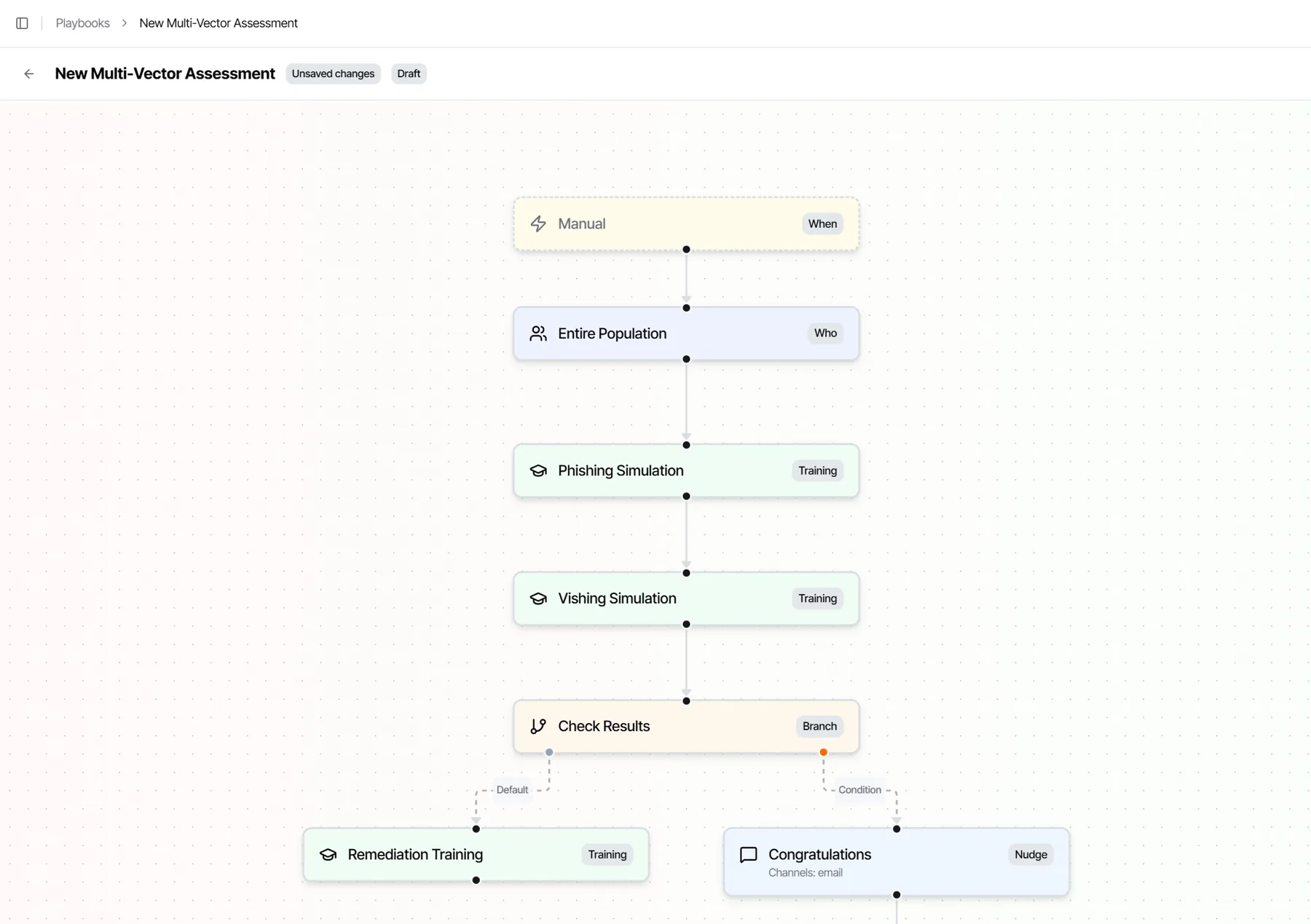
A real playbook: an email simulation, then a voice simulation, then a branch on the results.
Repeat clicks get a different answer.
You set the rule. Playbooks can also change access through Microsoft Entra ID or SailPoint, and a person approves the change.
- First clickA teachable moment
- Second click in 90 daysA two-minute module and a note to the manager
Teachable moments
The exact message, beside what they should have noticed.
Every path ends in coaching. Hover over a cue and it lights up in the message they received. Credential pages never store what people type, and you set the title, message and button.
See a teachable moment and a follow-up playbook run on your own scenario.
Livvy
Livvy runs it. You approve it.
Describe the program you want in plain language. Livvy, our AI security analyst, drafts the audience, scenarios, difficulty, follow-up and pace from your risk data, and explains why.
- Drafts and edits programs and simulations from a sentence.
- A person approves every launch. Only a person can approve and send.
- Answers questions about results, trends and who needs help next.
Reporter button
One click to report. In Outlook and Gmail.
Simulations get a thank-you and count toward report rate. Real reports go to the security mailbox your SOC already uses, with the original message and headers intact.
- Your brand: your own label, icon and confirmation.
- Ours or Microsoft’s: use our button, or keep Microsoft’s built-in Report button.
Measure what matters
Four questions.One screen.
Who needs help? What are we doing? Is it working? What should we change? Report rate, time-to-report and report-before-click show whether behavior changed. Missing data shows as a dash, never a zero.
Only real humans count
No bot clicks. No false failures blamed on your employees.
Email security scanners and link previewers “click” simulation links and inflate results. We classify every interaction. Only likely-human behavior affects the risk profile, and an image-only open never counts.
Safe by design
Realistic for your people. Safe for your company.
Simulations should feel real to the person and stay predictable for the security team.
No stored credentials
Credential pages never store what people type.
No call transcripts
Voice and SMS keep the result only: refused, reported or objective met.
Reports go where they should
A report suppresses only exact simulation matches. Everything else goes to your SOC.
Vetted domains, ready allowlists
40 vetted simulation domains per organization and an auto-generated allowlist package.
US or EU data residency
Your program’s data stays in the region you choose.
An AI that only proposes
In Multi-Channel Attacks, the AI never sees phone numbers or email addresses and never sends anything itself. Every move is checked against policy and budget, with an emergency stop at every level.
Switching from another tool
Keep your history.Lose the silo.
Results from the tool you run today can flow in as signals, so nothing starts from zero. Then run phishing natively, in the same platform that scores the risk and acts on it.
01
One risk model, no exports
Every simulation result lands in the same person’s Human Risk Index as their identity, email and access signals, the moment it happens.
02
The next step runs itself
A click branches the playbook into coaching, training or a control change, with no hand-off between tools.
03
One story for leadership
Risk going down, by business unit, instead of click rates from one tool and completions from another.
- Microsoft Attack Simulation Training Results flow in Tests aimed by risk, plus SMS, voice, QR and calendar, a library that stays current, and follow-up that runs itself.
- KnowBe4 Results flow in Each test aimed by the person’s risk instead of a schedule, voice and SMS that talk back, and the result in the same Human Risk Index as your identity and email signals.
- Proofpoint Security Awareness Results flow in Signals from your whole stack in one risk model, Proofpoint TAP included, and playbooks that act in your identity and IT tools.
- Cofense PhishMe Results flow in Voice, SMS and calendar in the same program, Cofense Triage reports counted as signals, and follow-up that runs itself.
- 01
Connect
Your current tool’s results arrive as signals beside identity, access and security alerts.
- 02
Aim
Livvy shows who is actually dangerous and why, whichever tool sent the test.
- 03
Consolidate
Move to Living Security Phishing on your schedule.
Questions
Phishing simulation, answered.
Do you have a phishing report button?
Yes, in Outlook and Gmail. Some teams call it a phish alert button. It installs as an Outlook report phishing add-in and works in Gmail too, with your own label, icon and confirmation message. One click reports the email. A simulation gets a thank-you and counts toward report rate. You can use ours or keep Microsoft’s built-in Report button.
Where do reported emails go?
Real reports go to the security mailbox your SOC already uses, with the original message and its headers intact. Only exact simulation matches are held back, so your SOC never triages a test.
What do we need to allowlist?
For delivery through your email gateway, a downloadable allowlist package with the sending details and steps for each gateway, including Microsoft 365 and Defender, Proofpoint and Mimecast. For direct injection, admin approval for mailbox access in Microsoft 365 or Google Workspace.
Should we deliver through our gateway (SMTP) or by direct injection?
Both work. SMTP through your gateway tests the whole email path, the way a real phish arrives, and needs the allowlist package. Direct injection places the simulation straight in the inbox through Microsoft 365 or Google Workspace and needs an admin to approve mailbox access.
How is this different from Microsoft Attack Simulation Training?
Living Security aims each test by access and recent behavior, runs email, QR, SMS, voice and calendar simulations in one program, follows every result with coaching and playbooks, and filters out scanner clicks. You don’t have to switch on day one: Microsoft’s results can flow in as signals while you move over.
What is Living Security Phishing?
Living Security Phishing is the phishing simulation built into the Living Security Platform. It aims each test with real risk data, runs it across email, QR code, conversational SMS, conversational voice and calendar invites, closes every result out with a teachable moment and a follow-up playbook, and feeds the result into the Human Risk Index.
What happens to repeat clickers?
You set the rules. For example, a first click gets a teachable moment, and a second click within 90 days gets a two-minute module and a note to the manager. Playbooks can also change access through Microsoft Entra ID or SailPoint, with a person approving the change.
Can phishing simulations run continuously, without scheduling campaigns?
Yes. Phishing Autopilot sends each person the right test at the right difficulty, on a five-level scale grounded in the NIST Phish Scale, at a pace inside the range you approve. You set the guardrails: spacing between tests, business hours in each person’s time zone, blackout dates, a grace period for new hires and an automatic pause if clicks spike.
How many phishing templates do you have?
Hundreds, in 31 languages. Livvy, our AI security analyst, also generates new templates, so the variations are unlimited. You can build your own from real phishing emails your secure email gateway stopped.
Are SMS and voice simulations on personal phones allowed?
It depends on your policy and on employee consent, so use personal phones only where both allow it. Start with a small group. Voice simulations use AI personas you design, never cloned voices of your real executives, and we keep the result, never a recording.
Send the right testto the right person.
See Living Security Phishing aim, coach and measure in one loop, with your own risk data.