Voice phishing (vishing) simulation
Voice phishing simulationthat talks back.
Real attackers don’t leave a voicemail and wait. They call, they build rapport and they push. Living Security’s vishing simulation puts an AI caller on the line that holds the whole conversation, then reveals itself and coaches.
Security teams at




%20--%3e%3csvg%20version='1.1'%20id='Layer_1'%20xmlns='http://www.w3.org/2000/svg'%20xmlns:xlink='http://www.w3.org/1999/xlink'%20x='0px'%20y='0px'%20viewBox='0%200%20185.6%2073.2'%20style='enable-background:new%200%200%20185.6%2073.2;'%20xml:space='preserve'%3e%3cstyle%20type='text/css'%3e%20.st0{fill:%2300095B;}%20%3c/style%3e%3cg%20id='Ford_Script'%3e%3cpath%20class='st0'%20d='M185.5,22c0.2-0.4,0-0.6-0.5-0.6c-2.4,0-5.5,0-8,0c-0.6,0-0.9,0.1-1.2,0.6c-0.9,1.8-12.1,18.5-14.2,21.8%20c-0.4,0.5-0.8,0.4-0.8-0.1c-0.2-1.9-1.9-4.2-4.5-5.2c-2-0.8-4-1-6-0.7c-3.7,0.5-7,2.4-9.8,4.6c-4.3,3.3-8.1,7.6-12.9,10.7%20c-2.6,1.7-6.3,3.2-8.7,1c-2.2-2-1.9-6.5,1.4-10c0.3-0.4,0.8-0.1,0.7,0.3c-0.3,1.6,0.1,3.1,1.3,4.2c1.5,1.3,3.5,1.5,5.3,0.6%20c2.1-1,3.3-3.1,3.7-5.4c0.6-3.6-2.2-6.7-5.6-6.9c-2.8-0.2-5.5,0.8-8.1,2.9c-1.3,1.1-2,1.9-3.2,3.5c-0.3,0.4-0.7,0.4-0.7-0.1%20c0.1-4.6-1.7-7.1-5.5-7.2c-2.9-0.1-6,1.5-8.5,3.5c-2.7,2.1-5,5-7.5,7.7c-0.3,0.3-0.6,0.3-0.7-0.3c-0.1-3-0.8-5.9-2.2-8%20c-0.5-0.7-1.5-1.1-2.4-0.6c-0.4,0.2-1.8,0.9-2.8,1.7c-0.5,0.4-0.7,1-0.5,1.8c1.3,4.5,1,9.6-0.8,14c-1.7,4-4.9,7.5-8.8,8.8%20c-2.5,0.8-5.2,0.4-6.8-1.8c-2.2-3.1-1.3-8.5,2-12.9c2.9-3.9,7.2-6.4,11.4-8c0.5-0.2,0.6-0.5,0.5-0.9c-0.2-0.7-0.6-1.6-0.7-2.1%20c-0.4-1-1.5-1.2-2.8-1.1c-3.1,0.4-5.9,1.4-8.6,2.9c-7.2,3.8-10.8,11.3-12.4,15.3c-0.8,1.9-1.4,3.1-2.2,4.2c-1.1,1.4-2.6,2.7-5.2,5%20c-0.2,0.2-0.4,0.6-0.2,1c0.3,0.5,1.6,2.5,2,2.6c0.4,0.2,0.9-0.1,1.1-0.2c1.8-1.2,4-3.2,5.1-4.5c0.4-0.4,0.8-0.3,1,0.4%20c1,3.5,3.6,6.4,7.2,7.7c6.6,2.2,13.4-1,18.6-6.6c3.3-3.6,4.5-5.8,5.7-7.4c2.1-2.6,6.3-8.5,11.3-12.3c1.8-1.4,4-2.5,5.1-1.8%20c0.9,0.6,1.2,1.9-0.2,4.4c-5.1,9.3-12.6,20.3-14,22.9c-0.2,0.5,0,0.8,0.4,0.8c2.7,0,5.3,0,7.7,0c0.4,0,0.6-0.2,0.8-0.5%20c3.9-6.1,7.6-12,11.5-18c0.2-0.4,0.4-0.1,0.4,0.1c0.1,1.4,0.4,3.3,1.3,4.6c1.5,2.3,3.6,3.3,6,3.3c1.9,0,2.8-0.3,4.8-1%20c1.6-0.6,3-1.4,4-2.1c0.6-0.4,0.7,0.3,0.7,0.4c-0.9,4.9,0.2,10.6,5,13c5.8,2.8,12.1-1.2,15.8-4.8c0.4-0.3,0.7-0.3,0.8,0.4%20c0.1,1.4,0.7,3,1.8,4.2c3.1,3.1,9.2,1.9,15.5-2.9c4-3.1,8.2-7.4,11.9-12c0.1-0.2,0.2-0.5,0-0.7c-0.6-0.6-1.4-1.3-2-1.8%20c-0.3-0.2-0.6-0.2-0.9,0c-3.9,3.7-7.3,7.9-12.4,11.3c-1.7,1.2-4.4,2.1-5.6,0.5c-0.5-0.6-0.4-1.5,0.1-2.7%20C161.1,59.5,184.3,24.1,185.5,22z%20M154.9,51.7c0.1,0.3,0.4,0.5,0.7,0.7c0.1,0,0.2,0.1,0.1,0.4c-1,2.1-1.9,3.3-3.1,5.2%20c-1.1,1.7-2.4,3-4,4.3c-2.3,1.9-5.6,4-8.3,2.6c-1.2-0.6-1.7-2.3-1.7-3.6c0.1-3.8,1.7-7.7,4.9-11.5c3.8-4.7,8-7.1,10.8-5.8%20c2.9,1.4,1.9,4.7,0.7,7.3C154.8,51.3,154.8,51.5,154.9,51.7z'/%3e%3cpath%20class='st0'%20d='M17.2,71.8C8.6,71.8,1,66.5,0.1,57.2c-0.5-5.1,1-9.7,3.9-13.5c2.6-3.3,6.9-6.1,10.6-6.8%20c1.2-0.2,2.8-0.1,3.5,0.7c1,1.2,0.7,2.5-0.3,3.1c-2.8,1.4-6.2,3.9-7.9,7.2c-1.4,2.7-1.6,6,0.4,9.2c3.5,5.2,13.2,5.4,22.2-3%20c2.2-2,4.2-4,6.2-6.3c4-4.5,5.3-6.2,10.6-13.5c0.1-0.1,0.1-0.2,0.1-0.2c0-0.1-0.1-0.1-0.3-0.1c-3.5,0.1-6.6,1.1-9.6,3.4%20c-0.9,0.6-2.1,0.5-2.6-0.3c-0.6-0.9-0.2-2.1,0.8-2.8c4.8-3.3,10-3.9,15.4-4.8c0,0,0.4,0,0.7-0.4c2.2-2.8,3.9-5.4,6.2-8.2%20c2.4-2.9,5.4-5.5,7.7-7.5c3.2-2.8,5.3-3.7,7.4-4.9c0.6-0.3-0.1-0.6-0.2-0.6C63.1,5.5,50.8,2.6,39,7c-8.1,3-11.7,9.5-10,13.8%20c1.2,3.1,5.2,3.5,9,1.7c3.1-1.5,6-4,8.1-7.2c1.1-1.8,3.6-0.5,2.3,2.6c-3.4,8.1-10,14.5-18,14.8c-6.8,0.2-11.2-4.8-11.2-11%20c0-12.2,13.6-20.2,27.8-21.4c17.2-1.4,33.4,3.1,50.5,5.2c13.1,1.6,25.6,1.6,38.7-1.4c1.5-0.3,2.6,0.6,2.5,2.2%20c-0.1,2.3-1.9,4.4-6.2,6.8c-4.9,2.7-10.1,3.5-15.4,3.6c-13,0.1-25.1-5-37.6-7.7c0,0.5,0.2,1.2-0.3,1.5C72.3,15.7,66,20.9,61.8,28.2%20c-0.1,0.2-0.1,0.3,0.2,0.3c3.6-0.2,6.9-0.3,10.3-0.6c0.6,0,0.6-0.2,0.6-0.6c-0.3-2.5,0.4-5.4,2.6-7.4c2.3-2,5.1-2.3,7-0.8%20c2.1,1.7,1.9,4.7,0.8,6.9c-1.2,2.3-3.1,3.5-5,4.1c0,0-0.4,0.1-0.3,0.4c0.1,0.6,2.6,2,2.9,2.4c0.2,0.4,0.1,0.9-0.3,1.3%20c-0.3,0.3-0.7,0.6-1.2,0.6c-0.4,0-0.7-0.2-1.3-0.5c-1.1-0.6-2.6-1.6-3.6-2.9c-0.3-0.4-0.5-0.4-1.3-0.4c-3.7,0.2-9.4,0.8-13.3,1.2%20c-0.9,0.1-1.1,0.3-1.3,0.6c-6.2,10.2-12.8,21.3-20.1,28.6C30.6,69.6,24.1,71.7,17.2,71.8z%20M76.4,26.3c0.1,0.5,0.3,0.6,0.5,0.6%20c1.2-0.2,2.5-1.2,3.2-2.3c0.7-1,1-2.5,0.3-3.1c-0.6-0.5-1.6-0.4-2.4,0.3C76.6,23.1,76.2,24.9,76.4,26.3z'/%3e%3c/g%3e%3c/svg%3e)
%20--%3e%3csvg%20version='1.1'%20id='Layer_1'%20xmlns='http://www.w3.org/2000/svg'%20xmlns:xlink='http://www.w3.org/1999/xlink'%20x='0px'%20y='0px'%20viewBox='0%200%20300%20299.9'%20style='enable-background:new%200%200%20300%20299.9;'%20xml:space='preserve'%3e%3cstyle%20type='text/css'%3e%20.st0{fill:%23CC0000;}%20%3c/style%3e%3cpath%20class='st0'%20d='M0.1,150C0.1,67.1,67.2,0,150,0c82.8,0,150,67.1,150,150c0,82.8-67.2,150-150,150C67.2,299.9,0.1,232.8,0.1,150%20z%20M150,249.9c55.2,0,100-44.8,100-100c0-55.2-44.8-100-100-100C94.8,50,50,94.8,50,150C50,205.2,94.8,249.9,150,249.9z%20M200,150%20c0,27.6-22.4,50-50,50s-50-22.4-50-50s22.4-50,50-50S200,122.4,200,150L200,150z'/%3e%3c/svg%3e)
Why vishing simulation
Attackers pick up the phone.Most simulations don’t.
An email template on a schedule can’t tell you whether the person on the phone will read back a code. A voice phishing simulation that talks back can.
81%
of organizations had a phishing, vishing or smishing incident in the past year.Gartner, Sep 2026
74.8%
of risky behavior comes from 10% of the workforce.2026 Human Risk Report with the Cyentia Institute
Hear an AI caller work a help-desk pretext, then see the result land in the risk profile.
The AI caller
A caller that holds a real conversation.
An AI caller holds a natural, multi-turn phone conversation. It greets the employee by name, builds rapport, and works toward an objective, such as getting a code read back or getting a callback approved.
- Responds to what people say, the way a real caller would push back, reassure or press.
- Multi-turn, not a recording: every call goes where the employee takes it.
- In US English and more languages.
-
01
Greets them by name
A familiar pretext: the help desk, payroll, a vendor.
-
02
Builds rapport
Small talk and a plausible reason for the call.
-
03
Works the objective
A code read back, a callback approved.
-
04
Texts mid-call
“I just sent it to your phone.”
-
05
Reveals and coaches
Two warning signs and safe next steps.
One objective per call
Every call has one clear result.
Each voice simulation works toward one objective, so the result is never a judgment call: the employee refused, reported, or the caller met the objective.
- Pick the pretext: the help desk, payroll, a vendor.
- Pick the objective: a code read back or a callback approved.
- Aim it with risk data: send it to the people a real caller would target first.
Mid-call text
“I just sent it to your phone.”
Real attackers text a code or a link while they have you on the line, so the request feels verified. The voice simulation does the same, in the middle of the call.
- The same pressure an attacker uses: a code arrives while the caller waits.
- The right reaction to practice: stop, hang up and verify on a number you already know.
The reveal
Every call ends in a teachable moment.
When the call ends, the caller reveals the simulation, explains up to two warning signs, and gives safe next steps. People hang up knowing exactly what to do next time.
Try an attack on yourself
Take the call yourself.
A short voice phishing simulation in your browser. No phone number, nothing collected. See the warning signs you spotted, and the ones to watch for next time.
Incoming call
IT help desk
Mobile · unknown number
Phone call · A help desk call
Your phone rings. Do you answer?
Captions are on. Sound plays only if you answer, and you can turn it off.
Privacy by design
We keep the result. Never the call.
Every vishing simulation records the outcome: refused, reported or objective met. Never a recording, never a transcript. Nothing we can’t measure, and missing data shows as a dash.
- No recordings, no transcripts of any call.
- Results only: refused, reported, objective met.
- Honest metrics: nothing we can’t measure.
Hear the AI caller and see the results in your own program.
One loop
Every call counts toward risk.
Vishing results feed the same Human Risk Index and playbooks as email. A refused call steps the next test up. A met objective triggers coaching and a follow-up, automatically.
- One playbook across email and voice, branching on the results.
- One risk profile per person, whatever the channel.
- Livvy proposes, you approve every launch.
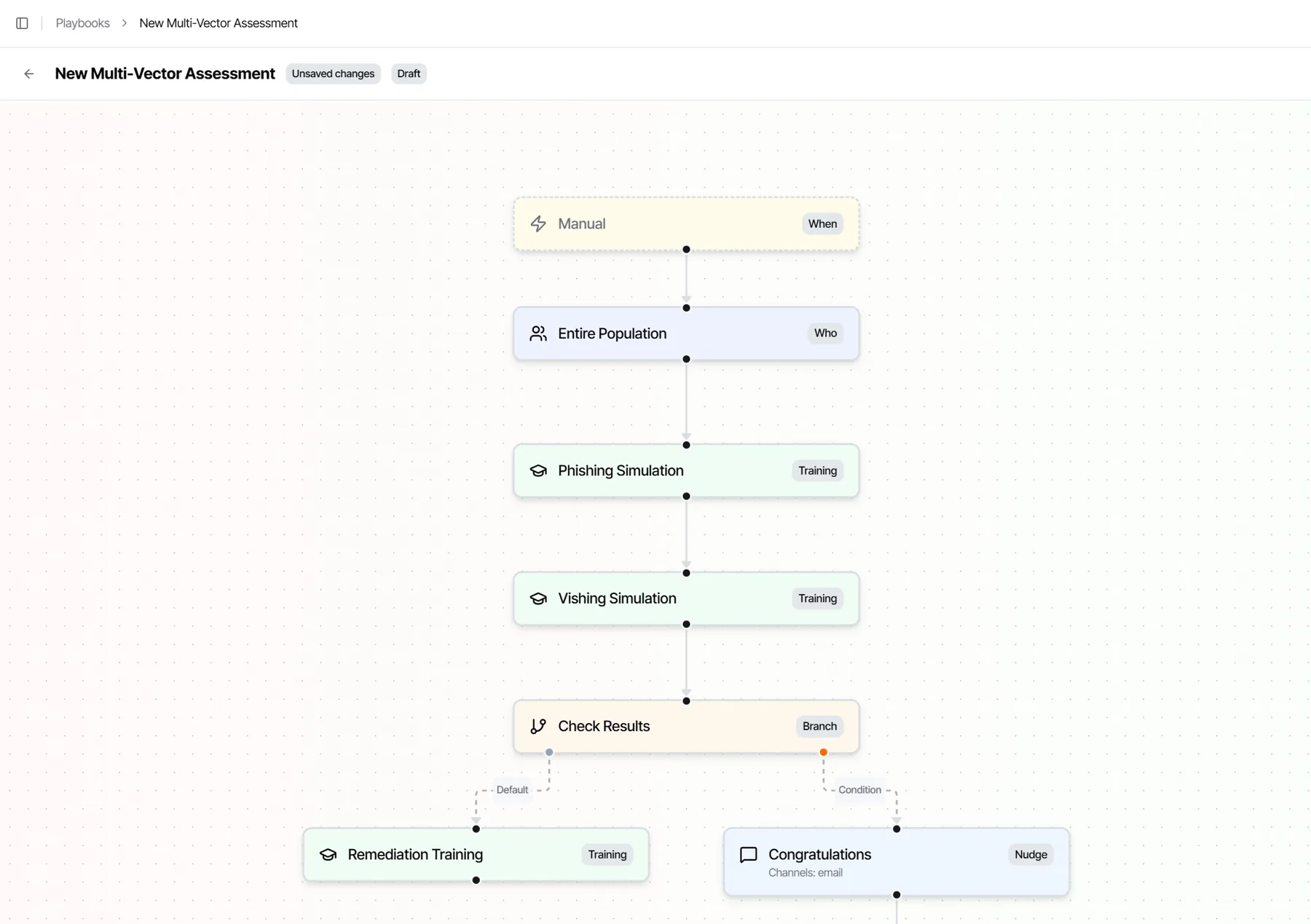
Text to call
One pretext, by text and by voice.
Attackers move between channels. In an SMS phishing simulation, a callback lure (“call this number”) hands off into a voice simulation on the same pretext, so you see whether people verify before they dial.
Also reached by calendar phishing: an invite leads to a Microsoft Teams meeting link with a voice deepfake simulation your team designs.
Questions
Vishing and voice phishing simulation, answered.
What is vishing?
Vishing, or voice phishing, is a phone call from an attacker who pretends to be someone you trust, such as the IT help desk, payroll or a vendor, to get you to read back a code, approve a request or share information. A caller who sounds friendly and urgent is harder to doubt than an email.
What is a vishing simulation?
A vishing simulation is a practice phone call that tests whether employees will hand over a code, approve a callback or act on a request from a caller they cannot verify. Living Security’s AI caller greets the employee by name, builds rapport, works toward one objective, can send a text mid-call, and ends by revealing the simulation with up to two warning signs and safe next steps.
Do you record the calls?
No. We record the result only: refused, reported or objective met. We never store a recording or a transcript of the call.
Can a text message hand off to a call?
Yes. In an SMS phishing simulation, a callback lure (“call this number”) hands off into a voice simulation, so one pretext runs across text and voice, the way real attackers move between channels.
How is this different from a recorded robocall test?
A robocall plays the same message to everyone and cannot answer back. Living Security’s AI caller holds a real, multi-turn conversation: it responds to what each person says, pushes back or reassures the way an attacker would, and ends every call by coaching the employee on what to do next time.
Which languages does the voice simulation support?
Voice simulations run in US English and more languages.
Can your people spot the attackwhen it calls them by name?
See a vishing simulation run, and watch every result feed the Human Risk Index.