Content Studio
From threat to trainingin minutes.
Content Studio turns a prompt into a branded video, quiz and captions in your employees’ languages, reviewed by you and delivered by risk.
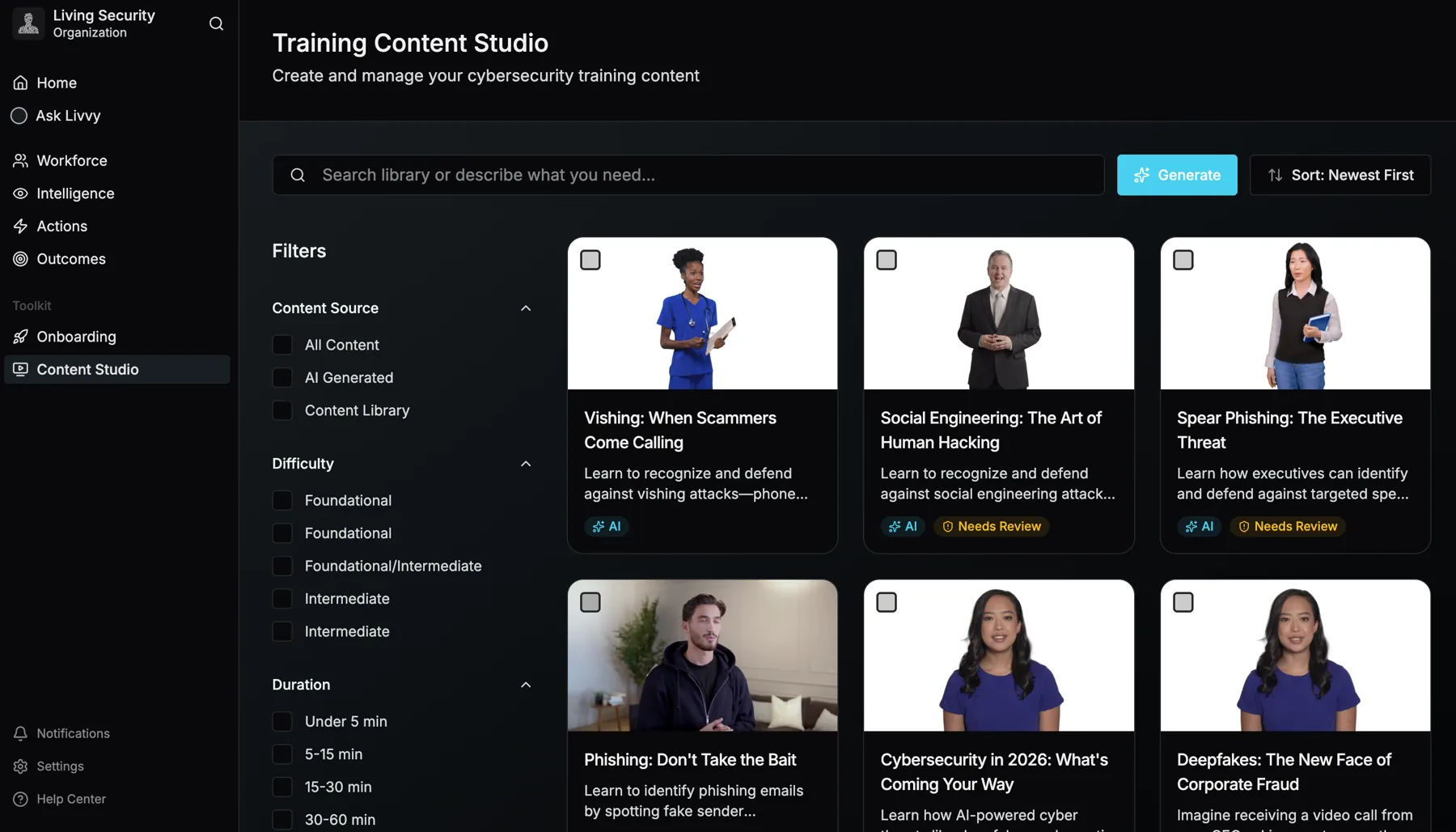
The Content Studio library. Every AI video carries its status until a person approves it.
Security teams at




%20--%3e%3csvg%20version='1.1'%20id='Layer_1'%20xmlns='http://www.w3.org/2000/svg'%20xmlns:xlink='http://www.w3.org/1999/xlink'%20x='0px'%20y='0px'%20viewBox='0%200%20185.6%2073.2'%20style='enable-background:new%200%200%20185.6%2073.2;'%20xml:space='preserve'%3e%3cstyle%20type='text/css'%3e%20.st0{fill:%2300095B;}%20%3c/style%3e%3cg%20id='Ford_Script'%3e%3cpath%20class='st0'%20d='M185.5,22c0.2-0.4,0-0.6-0.5-0.6c-2.4,0-5.5,0-8,0c-0.6,0-0.9,0.1-1.2,0.6c-0.9,1.8-12.1,18.5-14.2,21.8%20c-0.4,0.5-0.8,0.4-0.8-0.1c-0.2-1.9-1.9-4.2-4.5-5.2c-2-0.8-4-1-6-0.7c-3.7,0.5-7,2.4-9.8,4.6c-4.3,3.3-8.1,7.6-12.9,10.7%20c-2.6,1.7-6.3,3.2-8.7,1c-2.2-2-1.9-6.5,1.4-10c0.3-0.4,0.8-0.1,0.7,0.3c-0.3,1.6,0.1,3.1,1.3,4.2c1.5,1.3,3.5,1.5,5.3,0.6%20c2.1-1,3.3-3.1,3.7-5.4c0.6-3.6-2.2-6.7-5.6-6.9c-2.8-0.2-5.5,0.8-8.1,2.9c-1.3,1.1-2,1.9-3.2,3.5c-0.3,0.4-0.7,0.4-0.7-0.1%20c0.1-4.6-1.7-7.1-5.5-7.2c-2.9-0.1-6,1.5-8.5,3.5c-2.7,2.1-5,5-7.5,7.7c-0.3,0.3-0.6,0.3-0.7-0.3c-0.1-3-0.8-5.9-2.2-8%20c-0.5-0.7-1.5-1.1-2.4-0.6c-0.4,0.2-1.8,0.9-2.8,1.7c-0.5,0.4-0.7,1-0.5,1.8c1.3,4.5,1,9.6-0.8,14c-1.7,4-4.9,7.5-8.8,8.8%20c-2.5,0.8-5.2,0.4-6.8-1.8c-2.2-3.1-1.3-8.5,2-12.9c2.9-3.9,7.2-6.4,11.4-8c0.5-0.2,0.6-0.5,0.5-0.9c-0.2-0.7-0.6-1.6-0.7-2.1%20c-0.4-1-1.5-1.2-2.8-1.1c-3.1,0.4-5.9,1.4-8.6,2.9c-7.2,3.8-10.8,11.3-12.4,15.3c-0.8,1.9-1.4,3.1-2.2,4.2c-1.1,1.4-2.6,2.7-5.2,5%20c-0.2,0.2-0.4,0.6-0.2,1c0.3,0.5,1.6,2.5,2,2.6c0.4,0.2,0.9-0.1,1.1-0.2c1.8-1.2,4-3.2,5.1-4.5c0.4-0.4,0.8-0.3,1,0.4%20c1,3.5,3.6,6.4,7.2,7.7c6.6,2.2,13.4-1,18.6-6.6c3.3-3.6,4.5-5.8,5.7-7.4c2.1-2.6,6.3-8.5,11.3-12.3c1.8-1.4,4-2.5,5.1-1.8%20c0.9,0.6,1.2,1.9-0.2,4.4c-5.1,9.3-12.6,20.3-14,22.9c-0.2,0.5,0,0.8,0.4,0.8c2.7,0,5.3,0,7.7,0c0.4,0,0.6-0.2,0.8-0.5%20c3.9-6.1,7.6-12,11.5-18c0.2-0.4,0.4-0.1,0.4,0.1c0.1,1.4,0.4,3.3,1.3,4.6c1.5,2.3,3.6,3.3,6,3.3c1.9,0,2.8-0.3,4.8-1%20c1.6-0.6,3-1.4,4-2.1c0.6-0.4,0.7,0.3,0.7,0.4c-0.9,4.9,0.2,10.6,5,13c5.8,2.8,12.1-1.2,15.8-4.8c0.4-0.3,0.7-0.3,0.8,0.4%20c0.1,1.4,0.7,3,1.8,4.2c3.1,3.1,9.2,1.9,15.5-2.9c4-3.1,8.2-7.4,11.9-12c0.1-0.2,0.2-0.5,0-0.7c-0.6-0.6-1.4-1.3-2-1.8%20c-0.3-0.2-0.6-0.2-0.9,0c-3.9,3.7-7.3,7.9-12.4,11.3c-1.7,1.2-4.4,2.1-5.6,0.5c-0.5-0.6-0.4-1.5,0.1-2.7%20C161.1,59.5,184.3,24.1,185.5,22z%20M154.9,51.7c0.1,0.3,0.4,0.5,0.7,0.7c0.1,0,0.2,0.1,0.1,0.4c-1,2.1-1.9,3.3-3.1,5.2%20c-1.1,1.7-2.4,3-4,4.3c-2.3,1.9-5.6,4-8.3,2.6c-1.2-0.6-1.7-2.3-1.7-3.6c0.1-3.8,1.7-7.7,4.9-11.5c3.8-4.7,8-7.1,10.8-5.8%20c2.9,1.4,1.9,4.7,0.7,7.3C154.8,51.3,154.8,51.5,154.9,51.7z'/%3e%3cpath%20class='st0'%20d='M17.2,71.8C8.6,71.8,1,66.5,0.1,57.2c-0.5-5.1,1-9.7,3.9-13.5c2.6-3.3,6.9-6.1,10.6-6.8%20c1.2-0.2,2.8-0.1,3.5,0.7c1,1.2,0.7,2.5-0.3,3.1c-2.8,1.4-6.2,3.9-7.9,7.2c-1.4,2.7-1.6,6,0.4,9.2c3.5,5.2,13.2,5.4,22.2-3%20c2.2-2,4.2-4,6.2-6.3c4-4.5,5.3-6.2,10.6-13.5c0.1-0.1,0.1-0.2,0.1-0.2c0-0.1-0.1-0.1-0.3-0.1c-3.5,0.1-6.6,1.1-9.6,3.4%20c-0.9,0.6-2.1,0.5-2.6-0.3c-0.6-0.9-0.2-2.1,0.8-2.8c4.8-3.3,10-3.9,15.4-4.8c0,0,0.4,0,0.7-0.4c2.2-2.8,3.9-5.4,6.2-8.2%20c2.4-2.9,5.4-5.5,7.7-7.5c3.2-2.8,5.3-3.7,7.4-4.9c0.6-0.3-0.1-0.6-0.2-0.6C63.1,5.5,50.8,2.6,39,7c-8.1,3-11.7,9.5-10,13.8%20c1.2,3.1,5.2,3.5,9,1.7c3.1-1.5,6-4,8.1-7.2c1.1-1.8,3.6-0.5,2.3,2.6c-3.4,8.1-10,14.5-18,14.8c-6.8,0.2-11.2-4.8-11.2-11%20c0-12.2,13.6-20.2,27.8-21.4c17.2-1.4,33.4,3.1,50.5,5.2c13.1,1.6,25.6,1.6,38.7-1.4c1.5-0.3,2.6,0.6,2.5,2.2%20c-0.1,2.3-1.9,4.4-6.2,6.8c-4.9,2.7-10.1,3.5-15.4,3.6c-13,0.1-25.1-5-37.6-7.7c0,0.5,0.2,1.2-0.3,1.5C72.3,15.7,66,20.9,61.8,28.2%20c-0.1,0.2-0.1,0.3,0.2,0.3c3.6-0.2,6.9-0.3,10.3-0.6c0.6,0,0.6-0.2,0.6-0.6c-0.3-2.5,0.4-5.4,2.6-7.4c2.3-2,5.1-2.3,7-0.8%20c2.1,1.7,1.9,4.7,0.8,6.9c-1.2,2.3-3.1,3.5-5,4.1c0,0-0.4,0.1-0.3,0.4c0.1,0.6,2.6,2,2.9,2.4c0.2,0.4,0.1,0.9-0.3,1.3%20c-0.3,0.3-0.7,0.6-1.2,0.6c-0.4,0-0.7-0.2-1.3-0.5c-1.1-0.6-2.6-1.6-3.6-2.9c-0.3-0.4-0.5-0.4-1.3-0.4c-3.7,0.2-9.4,0.8-13.3,1.2%20c-0.9,0.1-1.1,0.3-1.3,0.6c-6.2,10.2-12.8,21.3-20.1,28.6C30.6,69.6,24.1,71.7,17.2,71.8z%20M76.4,26.3c0.1,0.5,0.3,0.6,0.5,0.6%20c1.2-0.2,2.5-1.2,3.2-2.3c0.7-1,1-2.5,0.3-3.1c-0.6-0.5-1.6-0.4-2.4,0.3C76.6,23.1,76.2,24.9,76.4,26.3z'/%3e%3c/g%3e%3c/svg%3e)
%20--%3e%3csvg%20version='1.1'%20id='Layer_1'%20xmlns='http://www.w3.org/2000/svg'%20xmlns:xlink='http://www.w3.org/1999/xlink'%20x='0px'%20y='0px'%20viewBox='0%200%20300%20299.9'%20style='enable-background:new%200%200%20300%20299.9;'%20xml:space='preserve'%3e%3cstyle%20type='text/css'%3e%20.st0{fill:%23CC0000;}%20%3c/style%3e%3cpath%20class='st0'%20d='M0.1,150C0.1,67.1,67.2,0,150,0c82.8,0,150,67.1,150,150c0,82.8-67.2,150-150,150C67.2,299.9,0.1,232.8,0.1,150%20z%20M150,249.9c55.2,0,100-44.8,100-100c0-55.2-44.8-100-100-100C94.8,50,50,94.8,50,150C50,205.2,94.8,249.9,150,249.9z%20M200,150%20c0,27.6-22.4,50-50,50s-50-22.4-50-50s22.4-50,50-50S200,122.4,200,150L200,150z'/%3e%3c/svg%3e)
74.8%
Of risky behavior comes from 10% of the workforce (2026 Human Risk Report)
68%
Less time in a risky state after targeted action
4.9M
Identities in the research behind the platform
Leader
Named Leader in the Forrester Wave™: Human Risk Management Solutions, Q3 2024.
Two formats
Two formats. One prompt.
Pick an AI presenter or an animated visual story. Both come with captions and a quiz, and both carry your brand.
AI presenter video
A realistic presenter delivers your script, with a matching voice. Choose one, or let Livvy pick the best presenter and voice for the audience.
Animated visual story
Motion-graphics scenes with narration: email mock-ups, scenarios, before and after, timelines, process flows and charts, in the visual theme you pick.
Prompt to approval
Describe it. Livvy builds it. You approve it.
Ask in a sentence. Livvy writes the script, builds the scenes, adds the quiz and captions, applies your brand and translates it. Then it waits for you.
From one sentence to a branded video waiting for review.
-
01 · Ask
Describe what you need
Topic or pasted script, audience, tone, length, language, branding on or off.
-
02 · Script
Livvy writes it
A script in seconds, in your tone, with your forbidden terms left out.
-
03 · Scenes
It builds the video
Presenter or animated scenes, quiz and captions, your brand checked as a step.
-
04 · Review
You approve it
It lands in Needs review. Nobody is assigned it until a person approves.
On brand, every time
Training that looks like it came from your company, because it did.
One brand profile drives every step. It shapes the script, the visuals, the thumbnails and the presenter framing, and placeholder text is stripped before anything renders.
- Logo, colors and fonts on every render, download, SCORM package and playback.
- Tone and call to action written into the script.
- Watermark and caption style you set once.
- Forbidden terms that never make it into a script.
Need more than a logo? Add lower-thirds, split-screen and overlays.
Every language your people speak
Up to 10 languages in one request.
Add languages to the request and get dubbed video or translated captions. Machine output is a draft until a person reviews it.
- An organization glossary keeps your terms the same in every language.
- Structure checks make sure links, placeholders and formatting survive translation.
- A reviewer step and a record of which model produced each translation.
- Missing translations are flagged, and Content Studio can generate them.
We don’t publish a fake accuracy score. A percentage can’t tell you the words are right. A reviewer can.
Bring a threat you saw last week. We’ll turn it into training in the demo.
You stay in control
Livvy writes. You approve.
AI content never reaches an employee without a person signing off. Every video moves through four states.
-
State 1
Draft
Livvy’s first cut, or your edit in progress.
-
State 2
Needs review
Waiting for a named reviewer.
-
State 3
Changes requested
The reviewer sends it back with notes.
-
State 4
Approved
Only now can a playbook assign it.
Word-for-word when the words matter.
For a legal or policy script, turn on word-for-word mode. The presenter reads it exactly.
Used word-for-word, Livvy won’t rewrite it.Content Studio, word-for-word mode
Assignments stay pinned to the approved version. Edit the video later and learners keep what you approved until the new version is approved too.
Aimed by risk
The right video reaches the right person, automatically.
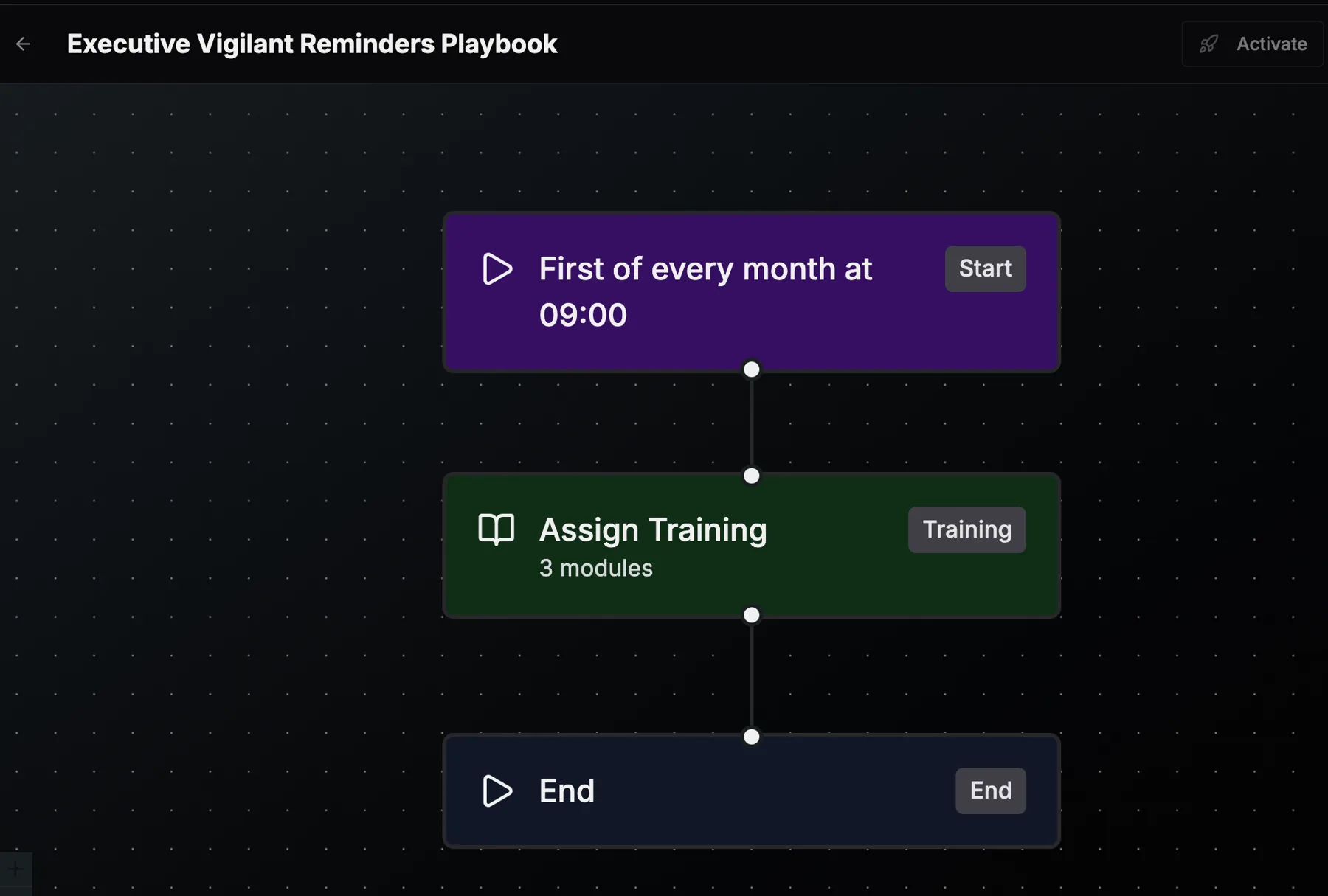
Playbooks deliver Content Studio videos to the people whose risk calls for them, and every completion flows back into the Human Risk Index.
- A phishing click triggers a two-minute module.
- A new hire gets a welcome series.
- A completion credential is issued automatically.
- Reminders skip people who already finished.
Watch anywhere
Watch it here, or ship it to your LMS.
The Living Security employee experience
Learners watch where playbooks assign it, and completions flow straight into the Human Risk Index.
SCORM export to your LMS
Export any module as a SCORM package, with your branding, captions and quiz included.
What’s included
- Formats
- AI presenter video and animated visual story
- Lengths
- 30 seconds (a single reminder), 90 seconds (one threat, one habit), 3 minutes (a full topic) and 5 minutes (policy and process)
- Languages
- Up to 10 in one request, as dubbed video or translated captions
- Captions and quiz
- On every video, in every language you add
- Branding
- Logo, colors, fonts, tone, watermark and forbidden terms from one brand profile
- Delivery
- The Living Security employee experience, or a SCORM package for your own LMS
Plus the library people love
A library people binge. A studio for everything it doesn’t cover.
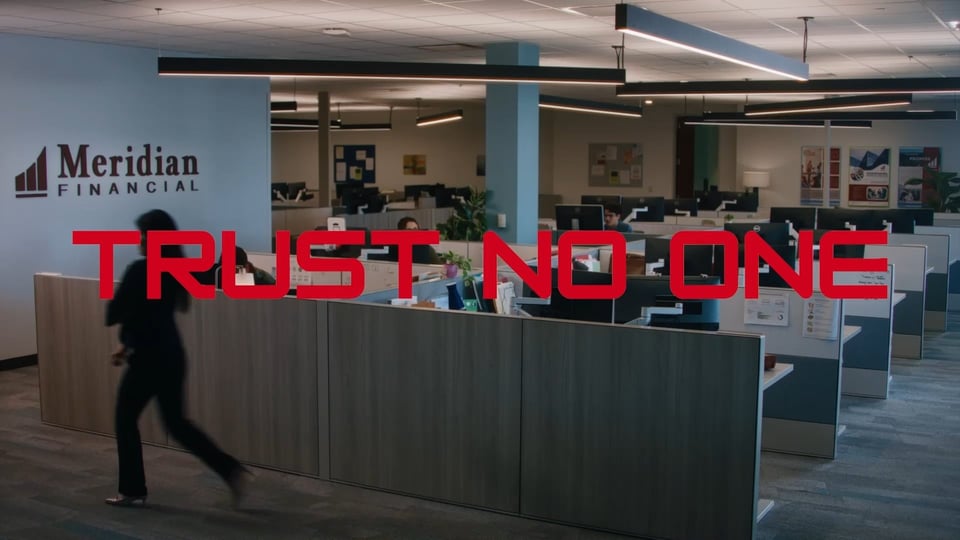
Content Studio sits next to a library of award-winning series and micro-learning: episodic, live-action training that feels like streaming TV.

More in Content Studio
Build it scene by scene. Make it personal.
When a prompt isn’t enough, take the controls. When one video isn’t enough, make one for every learner.
-
A full AI video studio, scene by scene
Title, presenter, B-roll and interactive quiz scenes, planned from your prompt and built in parallel. If one scene fails, the module still completes, and every revision is kept.
-
Personalized video for each learner
A video that greets each learner by name and mentions their department, manager or location, assembled when they press play.
-
Vertical and square video
Widescreen, square and vertical formats, so training fits a phone screen and a social feed.
-
Upload and dub
Upload a video you already have and dub it into the languages your people speak.
-
Fuller branding
Lower-thirds, split-screen and overlays on top of the brand profile you already set.
-
Video direction templates
Named templates for how a video is shot and paced, plus voice-over editing and puzzle authoring.
Questions
Content Studio, answered.
Is AI-generated training reviewed before employees see it?
Yes. Every video moves from Draft to Needs review, and a person approves it before anyone is assigned it. Reviewers can request changes. Assignments stay pinned to the approved version, so a later edit never changes what learners already have.
What languages does Content Studio support?
You can add up to 10 languages to one request, as dubbed video or translated captions, across dozens of languages. An organization glossary keeps your terms consistent, and machine output is treated as a draft until a person reviews it. Every translation keeps a record of which model produced it.
Can I upload my own script?
Yes. Paste a script and turn on word-for-word mode: the presenter reads it exactly, and Livvy won’t rewrite it. That suits legal and policy content.
Does it work with my LMS?
Yes. Learners can watch in the Living Security employee experience, or you can export any module as a SCORM package for your own LMS.
How long does a video take?
Minutes. Livvy writes the script in seconds, and a finished, rendered video with quiz and captions typically takes minutes. Choose a length of 30 seconds, 90 seconds, 3 minutes or 5 minutes.
Their library is big.Ours is yours.
Training aimed by real risk, on brand, in your people’s languages and approved by you. See Content Studio make one in the demo.