Social engineering defense
Attackers use every channel.Test every one.
Living Security simulates the email, the QR code, the text, the phone call and the calendar invite, aimed at the people attackers will target, and coaches each person the moment they slip. Every result lands in one risk profile.
Security teams at




%20--%3e%3csvg%20version='1.1'%20id='Layer_1'%20xmlns='http://www.w3.org/2000/svg'%20xmlns:xlink='http://www.w3.org/1999/xlink'%20x='0px'%20y='0px'%20viewBox='0%200%20185.6%2073.2'%20style='enable-background:new%200%200%20185.6%2073.2;'%20xml:space='preserve'%3e%3cstyle%20type='text/css'%3e%20.st0{fill:%2300095B;}%20%3c/style%3e%3cg%20id='Ford_Script'%3e%3cpath%20class='st0'%20d='M185.5,22c0.2-0.4,0-0.6-0.5-0.6c-2.4,0-5.5,0-8,0c-0.6,0-0.9,0.1-1.2,0.6c-0.9,1.8-12.1,18.5-14.2,21.8%20c-0.4,0.5-0.8,0.4-0.8-0.1c-0.2-1.9-1.9-4.2-4.5-5.2c-2-0.8-4-1-6-0.7c-3.7,0.5-7,2.4-9.8,4.6c-4.3,3.3-8.1,7.6-12.9,10.7%20c-2.6,1.7-6.3,3.2-8.7,1c-2.2-2-1.9-6.5,1.4-10c0.3-0.4,0.8-0.1,0.7,0.3c-0.3,1.6,0.1,3.1,1.3,4.2c1.5,1.3,3.5,1.5,5.3,0.6%20c2.1-1,3.3-3.1,3.7-5.4c0.6-3.6-2.2-6.7-5.6-6.9c-2.8-0.2-5.5,0.8-8.1,2.9c-1.3,1.1-2,1.9-3.2,3.5c-0.3,0.4-0.7,0.4-0.7-0.1%20c0.1-4.6-1.7-7.1-5.5-7.2c-2.9-0.1-6,1.5-8.5,3.5c-2.7,2.1-5,5-7.5,7.7c-0.3,0.3-0.6,0.3-0.7-0.3c-0.1-3-0.8-5.9-2.2-8%20c-0.5-0.7-1.5-1.1-2.4-0.6c-0.4,0.2-1.8,0.9-2.8,1.7c-0.5,0.4-0.7,1-0.5,1.8c1.3,4.5,1,9.6-0.8,14c-1.7,4-4.9,7.5-8.8,8.8%20c-2.5,0.8-5.2,0.4-6.8-1.8c-2.2-3.1-1.3-8.5,2-12.9c2.9-3.9,7.2-6.4,11.4-8c0.5-0.2,0.6-0.5,0.5-0.9c-0.2-0.7-0.6-1.6-0.7-2.1%20c-0.4-1-1.5-1.2-2.8-1.1c-3.1,0.4-5.9,1.4-8.6,2.9c-7.2,3.8-10.8,11.3-12.4,15.3c-0.8,1.9-1.4,3.1-2.2,4.2c-1.1,1.4-2.6,2.7-5.2,5%20c-0.2,0.2-0.4,0.6-0.2,1c0.3,0.5,1.6,2.5,2,2.6c0.4,0.2,0.9-0.1,1.1-0.2c1.8-1.2,4-3.2,5.1-4.5c0.4-0.4,0.8-0.3,1,0.4%20c1,3.5,3.6,6.4,7.2,7.7c6.6,2.2,13.4-1,18.6-6.6c3.3-3.6,4.5-5.8,5.7-7.4c2.1-2.6,6.3-8.5,11.3-12.3c1.8-1.4,4-2.5,5.1-1.8%20c0.9,0.6,1.2,1.9-0.2,4.4c-5.1,9.3-12.6,20.3-14,22.9c-0.2,0.5,0,0.8,0.4,0.8c2.7,0,5.3,0,7.7,0c0.4,0,0.6-0.2,0.8-0.5%20c3.9-6.1,7.6-12,11.5-18c0.2-0.4,0.4-0.1,0.4,0.1c0.1,1.4,0.4,3.3,1.3,4.6c1.5,2.3,3.6,3.3,6,3.3c1.9,0,2.8-0.3,4.8-1%20c1.6-0.6,3-1.4,4-2.1c0.6-0.4,0.7,0.3,0.7,0.4c-0.9,4.9,0.2,10.6,5,13c5.8,2.8,12.1-1.2,15.8-4.8c0.4-0.3,0.7-0.3,0.8,0.4%20c0.1,1.4,0.7,3,1.8,4.2c3.1,3.1,9.2,1.9,15.5-2.9c4-3.1,8.2-7.4,11.9-12c0.1-0.2,0.2-0.5,0-0.7c-0.6-0.6-1.4-1.3-2-1.8%20c-0.3-0.2-0.6-0.2-0.9,0c-3.9,3.7-7.3,7.9-12.4,11.3c-1.7,1.2-4.4,2.1-5.6,0.5c-0.5-0.6-0.4-1.5,0.1-2.7%20C161.1,59.5,184.3,24.1,185.5,22z%20M154.9,51.7c0.1,0.3,0.4,0.5,0.7,0.7c0.1,0,0.2,0.1,0.1,0.4c-1,2.1-1.9,3.3-3.1,5.2%20c-1.1,1.7-2.4,3-4,4.3c-2.3,1.9-5.6,4-8.3,2.6c-1.2-0.6-1.7-2.3-1.7-3.6c0.1-3.8,1.7-7.7,4.9-11.5c3.8-4.7,8-7.1,10.8-5.8%20c2.9,1.4,1.9,4.7,0.7,7.3C154.8,51.3,154.8,51.5,154.9,51.7z'/%3e%3cpath%20class='st0'%20d='M17.2,71.8C8.6,71.8,1,66.5,0.1,57.2c-0.5-5.1,1-9.7,3.9-13.5c2.6-3.3,6.9-6.1,10.6-6.8%20c1.2-0.2,2.8-0.1,3.5,0.7c1,1.2,0.7,2.5-0.3,3.1c-2.8,1.4-6.2,3.9-7.9,7.2c-1.4,2.7-1.6,6,0.4,9.2c3.5,5.2,13.2,5.4,22.2-3%20c2.2-2,4.2-4,6.2-6.3c4-4.5,5.3-6.2,10.6-13.5c0.1-0.1,0.1-0.2,0.1-0.2c0-0.1-0.1-0.1-0.3-0.1c-3.5,0.1-6.6,1.1-9.6,3.4%20c-0.9,0.6-2.1,0.5-2.6-0.3c-0.6-0.9-0.2-2.1,0.8-2.8c4.8-3.3,10-3.9,15.4-4.8c0,0,0.4,0,0.7-0.4c2.2-2.8,3.9-5.4,6.2-8.2%20c2.4-2.9,5.4-5.5,7.7-7.5c3.2-2.8,5.3-3.7,7.4-4.9c0.6-0.3-0.1-0.6-0.2-0.6C63.1,5.5,50.8,2.6,39,7c-8.1,3-11.7,9.5-10,13.8%20c1.2,3.1,5.2,3.5,9,1.7c3.1-1.5,6-4,8.1-7.2c1.1-1.8,3.6-0.5,2.3,2.6c-3.4,8.1-10,14.5-18,14.8c-6.8,0.2-11.2-4.8-11.2-11%20c0-12.2,13.6-20.2,27.8-21.4c17.2-1.4,33.4,3.1,50.5,5.2c13.1,1.6,25.6,1.6,38.7-1.4c1.5-0.3,2.6,0.6,2.5,2.2%20c-0.1,2.3-1.9,4.4-6.2,6.8c-4.9,2.7-10.1,3.5-15.4,3.6c-13,0.1-25.1-5-37.6-7.7c0,0.5,0.2,1.2-0.3,1.5C72.3,15.7,66,20.9,61.8,28.2%20c-0.1,0.2-0.1,0.3,0.2,0.3c3.6-0.2,6.9-0.3,10.3-0.6c0.6,0,0.6-0.2,0.6-0.6c-0.3-2.5,0.4-5.4,2.6-7.4c2.3-2,5.1-2.3,7-0.8%20c2.1,1.7,1.9,4.7,0.8,6.9c-1.2,2.3-3.1,3.5-5,4.1c0,0-0.4,0.1-0.3,0.4c0.1,0.6,2.6,2,2.9,2.4c0.2,0.4,0.1,0.9-0.3,1.3%20c-0.3,0.3-0.7,0.6-1.2,0.6c-0.4,0-0.7-0.2-1.3-0.5c-1.1-0.6-2.6-1.6-3.6-2.9c-0.3-0.4-0.5-0.4-1.3-0.4c-3.7,0.2-9.4,0.8-13.3,1.2%20c-0.9,0.1-1.1,0.3-1.3,0.6c-6.2,10.2-12.8,21.3-20.1,28.6C30.6,69.6,24.1,71.7,17.2,71.8z%20M76.4,26.3c0.1,0.5,0.3,0.6,0.5,0.6%20c1.2-0.2,2.5-1.2,3.2-2.3c0.7-1,1-2.5,0.3-3.1c-0.6-0.5-1.6-0.4-2.4,0.3C76.6,23.1,76.2,24.9,76.4,26.3z'/%3e%3c/g%3e%3c/svg%3e)
%20--%3e%3csvg%20version='1.1'%20id='Layer_1'%20xmlns='http://www.w3.org/2000/svg'%20xmlns:xlink='http://www.w3.org/1999/xlink'%20x='0px'%20y='0px'%20viewBox='0%200%20300%20299.9'%20style='enable-background:new%200%200%20300%20299.9;'%20xml:space='preserve'%3e%3cstyle%20type='text/css'%3e%20.st0{fill:%23CC0000;}%20%3c/style%3e%3cpath%20class='st0'%20d='M0.1,150C0.1,67.1,67.2,0,150,0c82.8,0,150,67.1,150,150c0,82.8-67.2,150-150,150C67.2,299.9,0.1,232.8,0.1,150%20z%20M150,249.9c55.2,0,100-44.8,100-100c0-55.2-44.8-100-100-100C94.8,50,50,94.8,50,150C50,205.2,94.8,249.9,150,249.9z%20M200,150%20c0,27.6-22.4,50-50,50s-50-22.4-50-50s22.4-50,50-50S200,122.4,200,150L200,150z'/%3e%3c/svg%3e)
The attack moved past the inbox
Attackers text, call and reply.Your test sends one email.
Most programs test email alone, on a schedule. Attackers start with an email, follow up by text and close on the phone.
81%
of organizations had a phishing, vishing or smishing incident in the past year.Gartner, Sep 2026
Three-quarters
of risky behavior comes from 10% of the workforce. Test them first.2026 Human Risk Report with the Cyentia Institute
68%
Less time in a risky state after targeted action.2026 Human Risk Report with the Cyentia Institute
25–30%
Drop in the share of risky users in the first six months.2026 Human Risk Report with the Cyentia Institute
By attack channel
Email. QR. Text. Voice. Calendar.One program.
Test the people attackers will target, the way they’ll target them. Every channel lands in the same risk profile and the same playbooks.
Email phishing
Branded scenarios with the cues a trained person should catch, delivered straight to the inbox.
See Living Security Phishing QR codeQR code phishing
A code for each recipient, tracked scans and a mobile landing page that coaches.
See QR code simulations SMSSMS Phishing
Two-way texts that reply to what the employee writes. Link, reply and callback lures.
See SMS Phishing VoiceVoice Phishing (Vishing)
An AI caller greets people by name and holds a real conversation toward an objective.
See Voice Phishing (Vishing) CalendarCalendar phishing
An invite with a Microsoft Teams meeting link that opens a voice deepfake simulation your team designs.
See calendar phishingSMS Phishing
Texts that talk back.
Link, reply and callback lures that respond to what the employee writes. A callback can hand off straight into a voice simulation.
Voice Phishing (Vishing)
An AI caller that knows their name.
A two-way phone conversation toward an objective, like a code read back, then a reveal that coaches. The result only, never a transcript.
Try an attack on yourself
Take the call yourself.
A short simulation in your browser. No phone number, nothing collected. See the red flags you spotted, and the ones you missed.
Incoming call
IT help desk
Mobile · unknown number
Phone call · A help desk call
Your phone rings. Do you answer?
Captions are on. Sound plays only if you answer, and you can turn it off.
From security teams
More people reporting.Fewer falling for it.
See every channel aimed at the people attackers will target, and the results in one risk profile.
“Living Security's training program has been critical in helping us drive behavioral change among our employees. We've seen a significant increase in employees reporting suspicious emails and an overall improvement in our security posture.”
“…I could see who was getting targeted the most with phishing messages—by individuals, roles, and business units.”
One pretext, every channel
Did they verify the request?Across email, text and voice.
Multi-channel campaigns follow one pretext across channels over two days. An AI agent plays the attacker, follows up and responds when the target replies.
Results by channel
Every channel, one risk profile per person.
Livvy spots the gap, like admins who report email but read a code back on the phone, and proposes the follow-up for a person to approve.
Teachable moments
Coaching at the moment of the slip.
The exact message beside what they should have noticed. Credential pages never store what people type.
Closes the loop
Email, then voice, then the right next step.
Playbooks chain the channels and branch on the result: remediation training for the people who fell for it, a thank-you for the people who didn’t. Every result feeds the Human Risk Index.
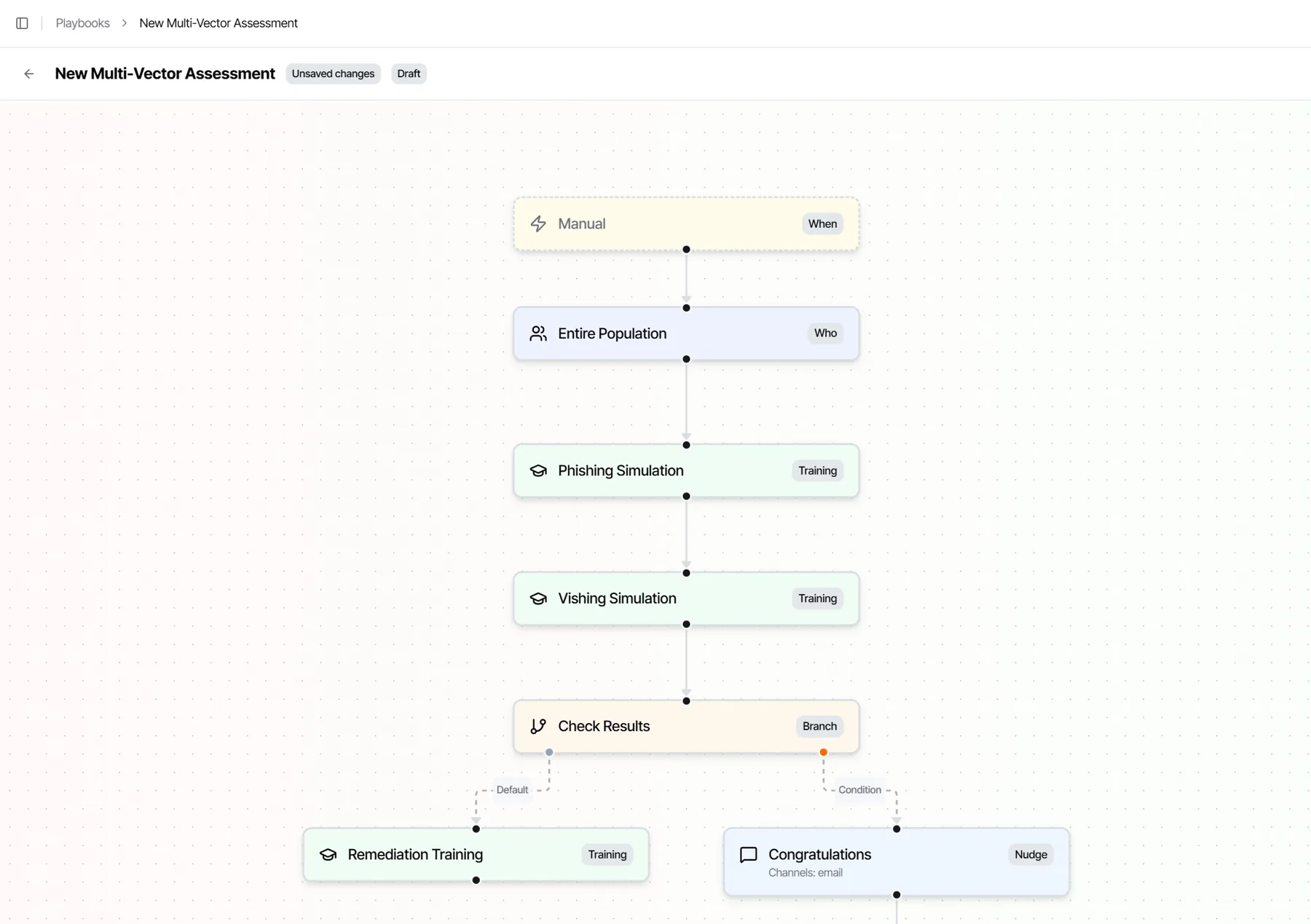
A real playbook: an email simulation, then a voice simulation, then a branch on the results.
Questions
Social engineering defense, answered.
What is social engineering defense?
Social engineering defense prepares people for attacks that trick them instead of breaking in: phishing email, QR codes, text messages, phone calls and calendar invites. Living Security simulates each channel the way attackers use it, coaches people the moment they slip, and aims the next test at the people attackers are most likely to target.
Which channels does Living Security simulate?
Email, QR code, SMS, voice and calendar. Email, QR code and calendar simulations come with Living Security Phishing; in calendar phishing, an invite leads to a Microsoft Teams meeting link with a voice deepfake simulation your team designs. SMS Phishing and Voice Phishing (Vishing) are conversational: two-way texts and an AI caller that respond to what the employee says.
Can one attack run across several channels?
Yes. Multi-channel campaigns follow one pretext across email, text and voice, such as an email from the CFO’s office, a text two hours later and a call the next morning. Each person gets one timeline and one question: did they verify the request?
What happens when someone falls for a simulation?
They see a teachable moment: the exact message beside the cues they missed, or after a call, the warning signs and safe next steps. A playbook can assign a two-minute module and a harder follow-up, and the result feeds the person’s risk profile.
Are vishing and SMS simulations safe?
Yes. Voice and SMS keep the result only, refused, reported or objective met, and never a transcript. Credential pages never store what people type, and a report of a real threat still goes to your SOC.
How do you measure success?
By behavior, beyond clicks: report rate, time-to-report, report-before-click and the risk trend for each person and cohort, across every channel in one risk profile.
Attackers use every channel.Test every one.
See email, QR, SMS, voice and calendar simulations aimed by risk, with the results in one risk profile.