Multi-Channel Attacks
One pretext.Every channel attackers use.
Real attackers don’t stop at one email. They follow up with a text, then call the next morning. Living Security’s Multi-Channel Attacks run one pretext across email, text, voice and calendar invites, and ask one question: did they verify the request?
Security teams at




%20--%3e%3csvg%20version='1.1'%20id='Layer_1'%20xmlns='http://www.w3.org/2000/svg'%20xmlns:xlink='http://www.w3.org/1999/xlink'%20x='0px'%20y='0px'%20viewBox='0%200%20185.6%2073.2'%20style='enable-background:new%200%200%20185.6%2073.2;'%20xml:space='preserve'%3e%3cstyle%20type='text/css'%3e%20.st0{fill:%2300095B;}%20%3c/style%3e%3cg%20id='Ford_Script'%3e%3cpath%20class='st0'%20d='M185.5,22c0.2-0.4,0-0.6-0.5-0.6c-2.4,0-5.5,0-8,0c-0.6,0-0.9,0.1-1.2,0.6c-0.9,1.8-12.1,18.5-14.2,21.8%20c-0.4,0.5-0.8,0.4-0.8-0.1c-0.2-1.9-1.9-4.2-4.5-5.2c-2-0.8-4-1-6-0.7c-3.7,0.5-7,2.4-9.8,4.6c-4.3,3.3-8.1,7.6-12.9,10.7%20c-2.6,1.7-6.3,3.2-8.7,1c-2.2-2-1.9-6.5,1.4-10c0.3-0.4,0.8-0.1,0.7,0.3c-0.3,1.6,0.1,3.1,1.3,4.2c1.5,1.3,3.5,1.5,5.3,0.6%20c2.1-1,3.3-3.1,3.7-5.4c0.6-3.6-2.2-6.7-5.6-6.9c-2.8-0.2-5.5,0.8-8.1,2.9c-1.3,1.1-2,1.9-3.2,3.5c-0.3,0.4-0.7,0.4-0.7-0.1%20c0.1-4.6-1.7-7.1-5.5-7.2c-2.9-0.1-6,1.5-8.5,3.5c-2.7,2.1-5,5-7.5,7.7c-0.3,0.3-0.6,0.3-0.7-0.3c-0.1-3-0.8-5.9-2.2-8%20c-0.5-0.7-1.5-1.1-2.4-0.6c-0.4,0.2-1.8,0.9-2.8,1.7c-0.5,0.4-0.7,1-0.5,1.8c1.3,4.5,1,9.6-0.8,14c-1.7,4-4.9,7.5-8.8,8.8%20c-2.5,0.8-5.2,0.4-6.8-1.8c-2.2-3.1-1.3-8.5,2-12.9c2.9-3.9,7.2-6.4,11.4-8c0.5-0.2,0.6-0.5,0.5-0.9c-0.2-0.7-0.6-1.6-0.7-2.1%20c-0.4-1-1.5-1.2-2.8-1.1c-3.1,0.4-5.9,1.4-8.6,2.9c-7.2,3.8-10.8,11.3-12.4,15.3c-0.8,1.9-1.4,3.1-2.2,4.2c-1.1,1.4-2.6,2.7-5.2,5%20c-0.2,0.2-0.4,0.6-0.2,1c0.3,0.5,1.6,2.5,2,2.6c0.4,0.2,0.9-0.1,1.1-0.2c1.8-1.2,4-3.2,5.1-4.5c0.4-0.4,0.8-0.3,1,0.4%20c1,3.5,3.6,6.4,7.2,7.7c6.6,2.2,13.4-1,18.6-6.6c3.3-3.6,4.5-5.8,5.7-7.4c2.1-2.6,6.3-8.5,11.3-12.3c1.8-1.4,4-2.5,5.1-1.8%20c0.9,0.6,1.2,1.9-0.2,4.4c-5.1,9.3-12.6,20.3-14,22.9c-0.2,0.5,0,0.8,0.4,0.8c2.7,0,5.3,0,7.7,0c0.4,0,0.6-0.2,0.8-0.5%20c3.9-6.1,7.6-12,11.5-18c0.2-0.4,0.4-0.1,0.4,0.1c0.1,1.4,0.4,3.3,1.3,4.6c1.5,2.3,3.6,3.3,6,3.3c1.9,0,2.8-0.3,4.8-1%20c1.6-0.6,3-1.4,4-2.1c0.6-0.4,0.7,0.3,0.7,0.4c-0.9,4.9,0.2,10.6,5,13c5.8,2.8,12.1-1.2,15.8-4.8c0.4-0.3,0.7-0.3,0.8,0.4%20c0.1,1.4,0.7,3,1.8,4.2c3.1,3.1,9.2,1.9,15.5-2.9c4-3.1,8.2-7.4,11.9-12c0.1-0.2,0.2-0.5,0-0.7c-0.6-0.6-1.4-1.3-2-1.8%20c-0.3-0.2-0.6-0.2-0.9,0c-3.9,3.7-7.3,7.9-12.4,11.3c-1.7,1.2-4.4,2.1-5.6,0.5c-0.5-0.6-0.4-1.5,0.1-2.7%20C161.1,59.5,184.3,24.1,185.5,22z%20M154.9,51.7c0.1,0.3,0.4,0.5,0.7,0.7c0.1,0,0.2,0.1,0.1,0.4c-1,2.1-1.9,3.3-3.1,5.2%20c-1.1,1.7-2.4,3-4,4.3c-2.3,1.9-5.6,4-8.3,2.6c-1.2-0.6-1.7-2.3-1.7-3.6c0.1-3.8,1.7-7.7,4.9-11.5c3.8-4.7,8-7.1,10.8-5.8%20c2.9,1.4,1.9,4.7,0.7,7.3C154.8,51.3,154.8,51.5,154.9,51.7z'/%3e%3cpath%20class='st0'%20d='M17.2,71.8C8.6,71.8,1,66.5,0.1,57.2c-0.5-5.1,1-9.7,3.9-13.5c2.6-3.3,6.9-6.1,10.6-6.8%20c1.2-0.2,2.8-0.1,3.5,0.7c1,1.2,0.7,2.5-0.3,3.1c-2.8,1.4-6.2,3.9-7.9,7.2c-1.4,2.7-1.6,6,0.4,9.2c3.5,5.2,13.2,5.4,22.2-3%20c2.2-2,4.2-4,6.2-6.3c4-4.5,5.3-6.2,10.6-13.5c0.1-0.1,0.1-0.2,0.1-0.2c0-0.1-0.1-0.1-0.3-0.1c-3.5,0.1-6.6,1.1-9.6,3.4%20c-0.9,0.6-2.1,0.5-2.6-0.3c-0.6-0.9-0.2-2.1,0.8-2.8c4.8-3.3,10-3.9,15.4-4.8c0,0,0.4,0,0.7-0.4c2.2-2.8,3.9-5.4,6.2-8.2%20c2.4-2.9,5.4-5.5,7.7-7.5c3.2-2.8,5.3-3.7,7.4-4.9c0.6-0.3-0.1-0.6-0.2-0.6C63.1,5.5,50.8,2.6,39,7c-8.1,3-11.7,9.5-10,13.8%20c1.2,3.1,5.2,3.5,9,1.7c3.1-1.5,6-4,8.1-7.2c1.1-1.8,3.6-0.5,2.3,2.6c-3.4,8.1-10,14.5-18,14.8c-6.8,0.2-11.2-4.8-11.2-11%20c0-12.2,13.6-20.2,27.8-21.4c17.2-1.4,33.4,3.1,50.5,5.2c13.1,1.6,25.6,1.6,38.7-1.4c1.5-0.3,2.6,0.6,2.5,2.2%20c-0.1,2.3-1.9,4.4-6.2,6.8c-4.9,2.7-10.1,3.5-15.4,3.6c-13,0.1-25.1-5-37.6-7.7c0,0.5,0.2,1.2-0.3,1.5C72.3,15.7,66,20.9,61.8,28.2%20c-0.1,0.2-0.1,0.3,0.2,0.3c3.6-0.2,6.9-0.3,10.3-0.6c0.6,0,0.6-0.2,0.6-0.6c-0.3-2.5,0.4-5.4,2.6-7.4c2.3-2,5.1-2.3,7-0.8%20c2.1,1.7,1.9,4.7,0.8,6.9c-1.2,2.3-3.1,3.5-5,4.1c0,0-0.4,0.1-0.3,0.4c0.1,0.6,2.6,2,2.9,2.4c0.2,0.4,0.1,0.9-0.3,1.3%20c-0.3,0.3-0.7,0.6-1.2,0.6c-0.4,0-0.7-0.2-1.3-0.5c-1.1-0.6-2.6-1.6-3.6-2.9c-0.3-0.4-0.5-0.4-1.3-0.4c-3.7,0.2-9.4,0.8-13.3,1.2%20c-0.9,0.1-1.1,0.3-1.3,0.6c-6.2,10.2-12.8,21.3-20.1,28.6C30.6,69.6,24.1,71.7,17.2,71.8z%20M76.4,26.3c0.1,0.5,0.3,0.6,0.5,0.6%20c1.2-0.2,2.5-1.2,3.2-2.3c0.7-1,1-2.5,0.3-3.1c-0.6-0.5-1.6-0.4-2.4,0.3C76.6,23.1,76.2,24.9,76.4,26.3z'/%3e%3c/g%3e%3c/svg%3e)
%20--%3e%3csvg%20version='1.1'%20id='Layer_1'%20xmlns='http://www.w3.org/2000/svg'%20xmlns:xlink='http://www.w3.org/1999/xlink'%20x='0px'%20y='0px'%20viewBox='0%200%20300%20299.9'%20style='enable-background:new%200%200%20300%20299.9;'%20xml:space='preserve'%3e%3cstyle%20type='text/css'%3e%20.st0{fill:%23CC0000;}%20%3c/style%3e%3cpath%20class='st0'%20d='M0.1,150C0.1,67.1,67.2,0,150,0c82.8,0,150,67.1,150,150c0,82.8-67.2,150-150,150C67.2,299.9,0.1,232.8,0.1,150%20z%20M150,249.9c55.2,0,100-44.8,100-100c0-55.2-44.8-100-100-100C94.8,50,50,94.8,50,150C50,205.2,94.8,249.9,150,249.9z%20M200,150%20c0,27.6-22.4,50-50,50s-50-22.4-50-50s22.4-50,50-50S200,122.4,200,150L200,150z'/%3e%3c/svg%3e)
Why multi-channel
Attacks switch channels.Most tests don’t.
Someone who reports every phishing email can still read a code back to a caller who mentions that email. A test on one channel can’t show that. One attack across every channel can.
81%
of organizations had a phishing, vishing or smishing incident in the past year.Gartner, Sep 2026
74.8%
of risky behavior comes from 10% of the workforce.2026 Human Risk Report
Build an attack
An objective, a persona, the channels.
Pick one of 17 ready-made attack objectives and a persona, then choose the channels the attack may use. Aim it at the people a real attacker would pick first, from your own risk data.
- 17 ready-made objectives, from an urgent approval to a fake incident-bridge meeting.
- A persona you design: the CFO’s office, the help desk, a vendor. Never a cloned voice of a real executive.
- The channels you allow: email, text, voice and calendar invites.
The AI attacker
An attacker that follows up.
An AI agent plays the attacker. It decides the next move, follows up when nobody answers, and responds when the target replies. Ask a text “who is this?” and it has an answer. Reply to the callback number and a voice picks up on the same story.
- Two-way on every channel: texts that reply and an AI caller that holds a real conversation.
- Text to call: a callback lure hands off into a voice simulation on the same pretext.
- In the employee’s language, so the attack feels like the ones they really get.
-
Day 1 · 09:10
The email
Board materials from the CFO’s office, approval needed.
-
Day 1 · 11:10
The text
“Did you see the board deck? We need your sign-off.”
-
Day 2 · 09:30
The call
“I can read you the approval code so you can release it.”
-
The result
Did they verify?
A call back on a known number ends it safely.
Calendar invites
A meeting that was never on the agenda.
Some of the most convincing attacks arrive as a meeting: a board-materials review or an incident bridge. The invite’s Microsoft Teams meeting link opens a voice deepfake simulation your team designs, as one step of the same attack.
- Board materials and incident bridges among the ready-made objectives.
- A voice your team designs, never a cloned real executive and never video.
- The reveal coaches on the spot, and the result joins the timeline.
Safe by design
An AI attacker on a short leash.Yours.
An AI that improvises across channels has to be safe enough to approve. So it proposes, and our control plane decides.
- It only proposes. The AI suggests each move and never sends anything itself.
- It never sees contact details. No phone numbers, no email addresses.
- Policy and budget first. Every action is checked against the limits you set before it goes out.
- An emergency stop at every level. One person, one attack or the whole program.
- Consent first. Personal phones only where your policy and consent allow. Start with a small group.
- No recordings. We keep the result, never the conversation.
One question
Did they verify the request?
Every attack ends in one timeline per person and one clear result: verified on a known number, reported, or handed over what the attacker asked for. No fake open rates, and missing data shows as a dash.
- One timeline per person, every channel in order.
- One result, not a click rate per channel.
- A teachable moment at the end of every path.
See one pretext run across email, text and voice in your own program.
One loop
Every attack counts toward risk.
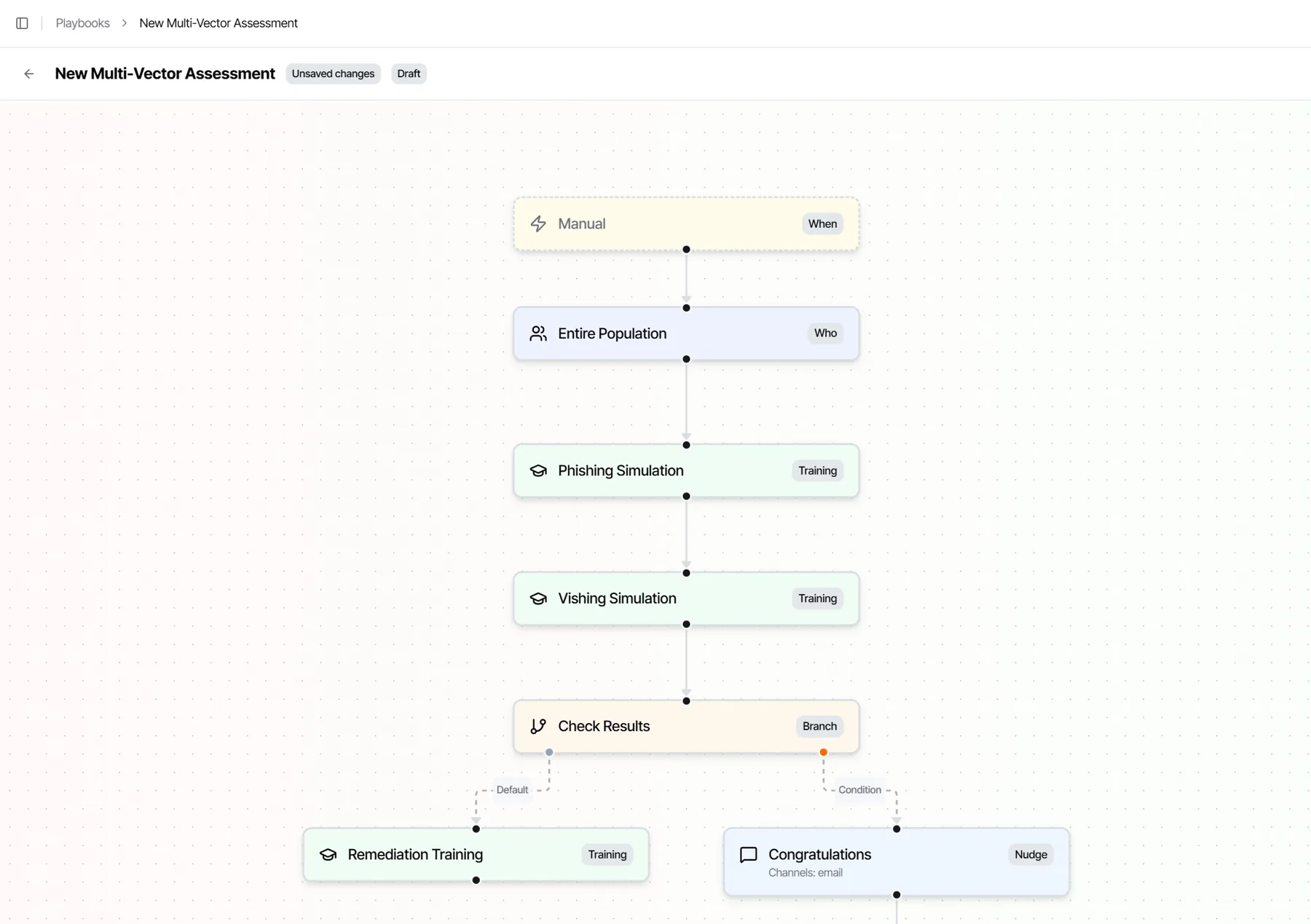
Results feed the same Human Risk Index and playbooks as every email, text and call. A verified request steps the next attack up. A code read back triggers coaching and a follow-up, automatically.
- One risk profile per person, whatever the channel.
- Playbooks branch on the result, with no exports and no second console.
- Livvy proposes, you approve every launch.
Questions
Multi-channel attack simulation, answered.
What is a multi-channel attack?
A multi-channel attack is social engineering that uses more than one channel for the same story. An email from the “CFO’s office” is followed by a text, then a phone call, each one making the last feel real. Attackers switch channels because each new one gets past the checks the last one hit.
What is a multi-channel attack simulation?
A practice attack that follows one pretext across email, text, voice and calendar invites, the way a real attacker would. Living Security’s Multi-Channel Attacks pick an objective and a persona, let an AI attacker follow up and respond when the employee replies, and record one result per person: did they verify the request?
Is a multi-channel attack the same as an omnichannel attack?
Yes. Some threat reports call it omnichannel phishing. Both mean one attack that moves across email, text, voice and other channels. We call it multi-channel.
Which channels can one attack use?
Email, text message, voice and calendar invites. You choose which channels each attack may use, and the AI attacker picks the next move from those.
What attacks can we run?
Pick one of 17 ready-made attack objectives, such as executive request verification, a help-desk callback, an urgent approval, or a fake board-materials or incident-bridge meeting, and a persona. Aim it at the people a real attacker would pick first, using your own risk data.
How do you keep an AI attacker safe?
The AI only proposes each move. It never sees phone numbers or email addresses and never sends anything itself. Our control plane checks every action against your policy and budget first, and an emergency stop works at every level: one person, one attack or the whole program.
What do you measure?
One timeline per person and one result: did they verify the request, report it, or hand over what the attacker asked for? We keep the result, never a recording or transcript, and every result feeds the same Human Risk Index and playbooks as the rest of your program.
Would your people verifybefore the third message?
See one pretext run across email, text, voice and calendar, and watch every result feed the Human Risk Index.