

Blogs  Beyond Redflags Security ...

.jpeg?width=32&height=32&name=047-FjykSoq-Wa8%20(1).jpeg)
 What if your security training is making your team more vulnerable? That’s the exact problem our Living Security Community contest winner, Peter Kirwan, tackles in his post. As an expert in the human factors of cybersecurity, Peter reveals the critical red flags. He shows you how to identify training that just didnt work and provides a clear path forward. Because modern security is far more complex than knowing the bones used when waving to a friend. He explains why old advice fails and what to teach instead.
Read Peter's winning blog post below then check out Living Security Community—a place where cybersecurity and IT professionals like Peter can share resources and discuss the topics most important to them.

Are You Focusing on the Wrong Red Flags?
So, you have a security awareness program but when did you last check the phishing content? Maybe it was once innovative, but times and attacks change so our training should too. What if some of the anti-phishing advice in there is outdated and now doing more harm than good? Let’s look at some popular anti-phishing advice, why some of these “red flags” should be consigned to history’s dustbin, and how we can do better.
Why 'Check for Typos' Is Outdated Advice
Over 45% of publicly available anti-phishing pages tell users to beware of emails with typos and poor grammar (Mossano et al., 2020). This is perhaps why if you ask a random person on the street to describe a phishing email, they’ll probably think of messages from a Nigerian Prince riddled with spelling and grammatical mistakes requesting urgent help transferring funds. Leaving aside attackers making deliberate errors to hook only the most vulnerable among us, the attackers eyeing up your organization simply don’t make mistakes. They might not be native English speakers but, between automated tools like Grammarly and cheap third-party proofreading services, there’s no reason for them to misplace so much as an apostrophe. If they are just worried their writing doesn’t quite “flow”, there are specialist editing services that promise a full refund if the click-through rate doesn’t improve. The phishing emails that survive your technical controls will usually be in perfect English.
When a Perfect Layout Hides a Threat
Over 11% of publicly available anti-phishing pages tell users to look out for poorly designed emails or webpages (Mossano et al., 2020). Here’s a direct quote from the UK’s National Cyber Security Centre.
“[Attackers] will try and create official-looking emails by including logos and graphics. Is the design (and quality) what you'd expect?”
Here’s the problem. This is how easy it is to create an official-looking landing page with the design and quality that users expect through cloning using the phishing simulator GoPhish.

Want to clone an email? Just open an email from the target company and get the source code. Here’s me retrieving the source code in Gmail. It’s just three steps…
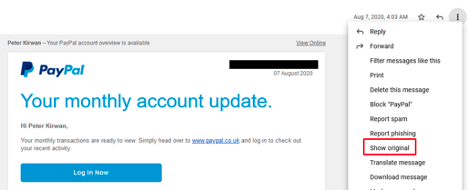
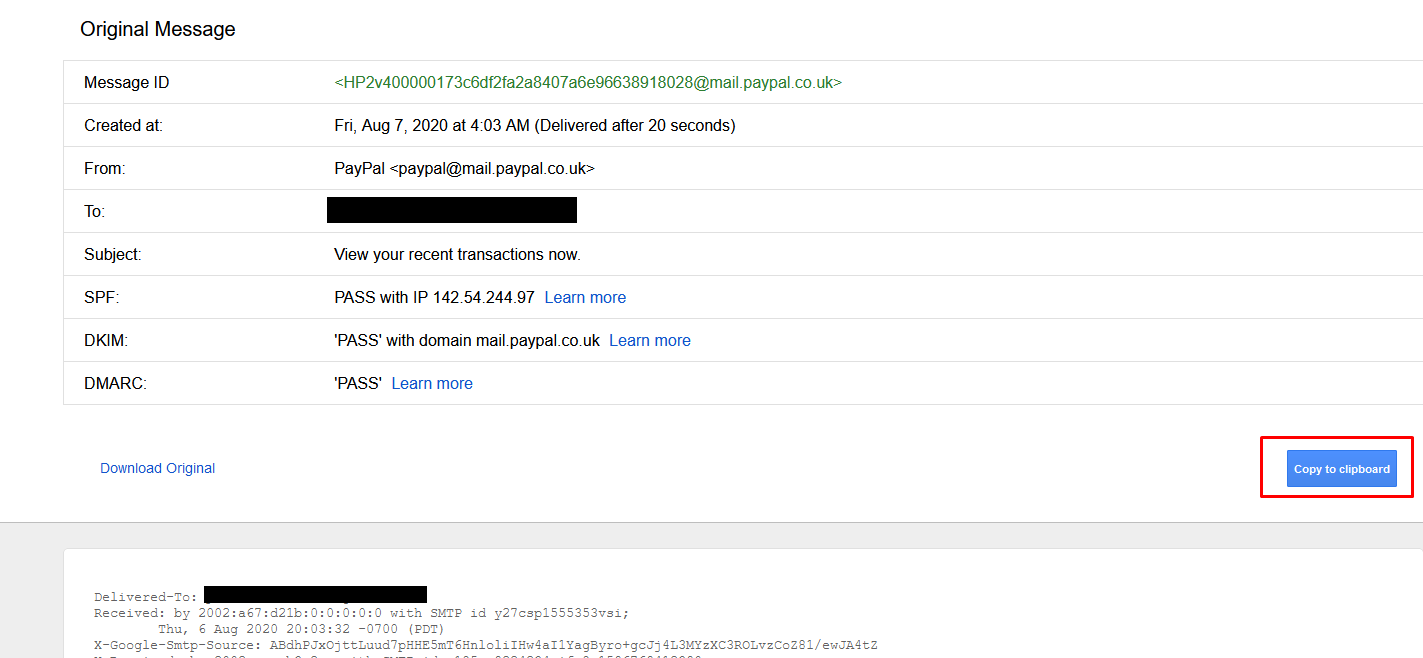
Then just paste it into your phishing editor.
It really is that easy and, hey, if the attacker clones like this they don’t even need to worry about proofreading. No self-respecting attacker will use anything less than a picture-perfect email and landing page.
Can You Really Trust the HTTPS Padlock?
It’s 2021. According to The APWG Phishing Activity Trends Report, 83% of phishing sites use HTTPS and yet over 23% of anti-phishing pages are telling users that the lack of HTTPS is a red flag (Mossano et al., 2020). We can do better.
How to Vet Senders Beyond 'Stranger Danger'
We should still tell users to check the sender though right?
Well yes … but it matters how you do it. Done badly, this red flag can cause more harm than good because there are just so many ways to spoof a sender's address.
We need to go beyond just telling users to “check the sender” and show them how. We need to explain the difference between display names and sender email addresses. We need to explain how display name spoofing and lookalike spoofing of email addresses work. If your organization has DMARC, DKIM, and SPF properly set up, then your users mostly don’t have to worry about exact address spoofing. If you’re unsure what those acronyms mean, please take a moment to learn about how you can quickly and easily set them up for a big security win.
Without this added depth we risk users on mobile devices, for example, seeing something like this from “joe smith” in preview and thinking it’s safe because they believe they’ve checked the sender…

Display name spoofing is disturbingly easy and in Gmail, for example, it can be turned on through the normal account settings. Attackers can even include an email address in the display name so users think they’ve seen the address when they were only looking at the display name. There are some technical controls to mitigate this but none of them are perfect.
Maybe all this seems obvious to you. To many, it’s clearly not. Though 40% of publicly available anti-phishing webpages told users to check if the sender was “unusual or unexpected”, none of them warned about the possibility of spoofing (Mossano et al., 2020).
Oh and the other thing they didn’t do? They didn’t think to mention that the sender might look legitimate because it's coming from a hacked company inbox as often happens with Business Email Compromise.

What’s the Real Harm of Bad Advice?
Maybe these are only some of the red flags you tell users to look out for. If so, it’s tempting to think that there’s no harm in raising them. It might seem like it’ll help users spot some of the more primitive phish while they can use other tips to spot more advanced attacks. After all, it’s not like you ever said that any polished-looking email with zero typos and a legit-looking sender was safe… right? Just because you didn’t say this, doesn’t mean your users didn’t hear it though.

Given red flags to check for danger there’s often a natural tendency to take the absence of any one red flag as a reason to feel safer. Let’s say I’m camping after recently watching Liam Neeson in the wilderness film The Grey and as a result, I am particularly worried about wolves. Searching out some expert advice about wolf red flags, I look out for wolf tracks, wolf droppings, a wolf den, and animal carcasses where large bones appear bitten through. Let’s say I’m extra diligent and check all these signs. Now, logically, of course, none of these is by themselves a necessary indicator of wolves. There might, for example, be no recent droppings because wolves have only recently come into the area. The way the mind works, though, my confidence increases with each red flag that I find to be absent. No droppings? Feeling a little better. No tracks? Feeling even safer.
Unlike my camping trip, your users often won’t run through all your red flags when they encounter a phishing email. If you’re lucky, they’ll check one or two. The worry is they look for typos, layout mistakes, or HTTP, and the absence of these increases their confidence in an email’s safety. The red flags then become green lights and that is how your training can make it more likely that users click on phishing emails.
Signs Your Security Training is Ineffective
Many organizations have a security training program in place, but having a program and having an effective one are two different things. Too often, training becomes a compliance checkbox, creating a false sense of security for leadership and a tedious requirement for everyone else. If your current approach isn’t leading to measurable improvements in security posture, it might be doing more harm than good by consuming resources without reducing risk. The first step to improving your program is to honestly assess whether it’s working. Several clear signs can tell you if your training is falling short and failing to build a more secure workforce.
Stagnant Performance and Security Metrics
One of the most telling signs of an ineffective program is a lack of improvement in key security metrics. You might see high completion rates for training modules, but if your phishing simulation click rates remain flat, or the number of malware incidents isn't decreasing, the training isn't translating into action. Employees are going through the motions, but their actual security-related performance isn't changing. This disconnect often happens when training is generic and not reinforced. True human risk management requires correlating training data with real-world security events to see if behaviors are actually improving where it matters most.
Lack of Employee Engagement and Support
If employees view security training as a boring, mandatory chore, they are unlikely to absorb the information. Programs that rely heavily on long videos or dense slides without any interaction fail to capture attention. When people are not engaged, they don't learn, and the entire effort is wasted. A clear indicator of this problem is when you hear constant complaints or see people simply clicking through the material as fast as possible to get it over with. Without genuine engagement and a sense that the security team is there to support them, employees won't see themselves as part of the solution.
Mismatch Between Training and Job Roles
A one-size-fits-all approach to security training is destined to fail. The security risks faced by a software developer are vastly different from those encountered by someone in the finance department. When training content doesn't align with an employee's specific job functions and daily tasks, it feels irrelevant and is quickly forgotten. For example, teaching your entire organization about SQL injection vulnerabilities is not an effective use of time. Effective training must be targeted and contextual, addressing the unique risks and responsibilities of different roles within the company to ensure the lessons are both applicable and memorable.
The Strategic Role of Security Training in Business
Effective security training is much more than an IT requirement; it's a strategic business initiative that directly protects the organization's bottom line and reputation. When viewed as a core component of your overall risk management strategy, it transforms from a cost center into a value-driving function. This shift in perspective is critical for getting executive buy-in and the resources needed to build a truly impactful program. By moving beyond simple compliance, you can align your security efforts with broader business objectives, demonstrating clear ROI and strengthening the organization’s resilience against evolving threats in a measurable way.
Connecting Training Initiatives to Business Goals
For a security program to be considered strategic, its leaders must be able to clearly articulate how it supports the company's primary business goals. It’s not enough to report on how many employees completed a training module. Instead, you need to show how improved security behaviors reduce the risk of a costly data breach, protect intellectual property, and ensure business continuity. A CISO who can walk into a board meeting and connect the training program to a quantifiable reduction in financial risk is demonstrating strategic value. This is how security becomes a business enabler rather than just a technical function.
Shifting from Reactive Training to Proactive Risk Reduction
Traditional training programs are often reactive, assigning modules after an employee fails a phishing test or after an incident has already occurred. A strategic approach, however, is proactive. It involves using data to predict where the next incident is likely to come from and intervening before it happens. By analyzing a wide range of signals across employee behavior, identity and access systems, and incoming threats, you can identify high-risk individuals and patterns. This allows you to deliver targeted, preventative micro-training or policy nudges, moving from a "detect and respond" model to a more effective "predict and prevent" posture.
How to Properly Evaluate Training Effectiveness
Measuring the effectiveness of your security training requires looking beyond superficial metrics. While completion rates and quiz scores are easy to track, they tell you very little about whether your program is actually reducing risk. A truly effective evaluation focuses on tangible outcomes and behavioral changes. It seeks to answer the critical question: Are our employees making safer decisions in their day-to-day work as a result of this training? Adopting a more sophisticated approach to measurement will not only reveal the true impact of your program but also provide the insights needed to continuously improve it.
Measure Behavior Change, Not Just Completion Rates
The ultimate goal of any security training program is to positively influence employee behavior. Therefore, the most important metric of success is not who completed the training, but whether their actions have become more secure. Are they reporting more suspicious emails? Are they using stronger, unique passwords? Are they handling sensitive data with greater care? Tracking these behavioral outcomes is essential. A modern human risk management platform can help you measure these changes over time, providing clear evidence of your program's impact on the organization's security posture.
Distinguish Learner Satisfaction from Skill Application
It's great if your employees enjoy the training, but satisfaction does not equal effectiveness. A fun, gamified module might receive positive feedback, but if the skills learned are not applied on the job, the training has failed in its primary objective. Learner satisfaction is a poor proxy for risk reduction. Instead of relying on "smile sheets," focus on assessing skill application through realistic simulations, observational data, and performance metrics. While engagement is a crucial first step, the evaluation must go further to confirm that knowledge has been successfully transferred into real-world secure habits.
Identify Barriers to On-the-Job Implementation
Sometimes, an employee knows the right thing to do but is prevented from doing it by organizational friction. For example, a policy might require using a secure file transfer system, but if the system is slow and cumbersome, employees may resort to using personal cloud storage out of convenience. An effective evaluation process should seek to identify these barriers. Are there processes that make the secure way the hard way? Is there a lack of support from managers? Understanding and addressing these obstacles is just as important as delivering the training itself for achieving lasting behavior change.
Actionable Steps for Improving Training Programs
Recognizing that your current security training isn't working is the first step. The next is to take concrete, actionable steps to transform it into a strategic asset that measurably reduces human risk. Improving your program doesn't require starting from scratch. It involves shifting your focus from compliance to behavior, adopting modern methods, and creating a culture of continuous improvement. By implementing a few key changes, you can build a program that not only engages your employees but also delivers the security outcomes your organization needs to stay protected.
Focus on Key Performance Indicators (KPIs)
Move beyond vanity metrics and focus on KPIs that truly reflect risk reduction. While completion rates can be a baseline, prioritize metrics like engagement, knowledge retention, and, most importantly, the adoption rate of secure behaviors. How quickly are employees applying what they've learned? Are they using the security tools you provide, like password managers? Tracking these performance-based KPIs will give you a far more accurate picture of your program's effectiveness and help you demonstrate its value to leadership in clear, business-relevant terms.
Adopt Modern Instructional Methods
The days of hour-long slide presentations are over. To truly change behavior, you need to engage employees with modern, interactive learning methods. This includes realistic phishing simulations, short and relevant micro-trainings, and contextual nudges delivered at the moment of need. These methods are more effective because they fit into the flow of work and provide timely reinforcement. An AI-native platform can help automate the delivery of these interventions with human oversight, ensuring the right person gets the right training at the right time, based on their specific risk profile.
Create a Continuous Feedback Loop
An effective security program is not a one-time event; it's a continuous process of learning and adaptation. Create channels for employees to easily ask questions and report suspicious activity without fear of blame. This feedback provides valuable insights into emerging threats and areas where your training or policies may be unclear. In turn, use the data and insights gathered from your program to constantly refine your approach. This two-way communication builds a strong security culture where everyone feels responsible for protecting the organization.
A New Approach: Focus on What's Hard to Fake
The solution is to switch our focus to things that are hard to fake and red flags that won’t become green lights.
A Smarter Way to Analyze Links
Some phishing emails don’t have links but, for those that do, train users to check links on both desktop and mobile devices. Links are probably the hardest element of an email to fake. Sure attackers can hide a dodgy URL behind anchor text like this where the anchor text suggests google but the link goes to Facebook.
Or behind an image like this:

Ultimately, though, if the user knows how to check, then the dodgy URL, or the suspicious link shortener in front of it, will be revealed.
Again, how you do this matters. It’s not enough to tell them to hover. You need to tell them how to look for the true destination URL behind anchor text/elements on both desktop and mobile devices. It’s also not enough to get them to just look at the destination URLs, they need to know how to read them.
The bad news? Research shows that most users struggle to recognize the root domains that show a link's actual destination (Albakry et al., 2020). So you’re going to need to invest some resources to make sure users understand how to quickly pick out the root domain from something like this.
https://www.ups.delivery.net/gb/en/Home.page?WT.srch=1&WT.mc_id=ds_gclid:EAIaIQobChMIsKGVurDY8AIVB5eyCh36Wgc_EAAYASAAEgK-zfD_BwE:dscid:71700000050016000:searchterm:ups&gclid=EAIaIQobChMIsKGVurDY8AIVB5eyCh36Wgc_EAAYASAAEgK-zfD_BwE&gclsrc=aw.ds
The good news is that I’ve got a short (albeit slightly cringe) game that will teach them just that. It’s yours to use for free with attribution and the Qualtrics code is available on request if you’d like to build your own version. Check it out here https://peterkirwan.co.uk/phishgame (redirects to https://hwsml.eu.qualtrics.com/jfe/form/SV_3g5Imw87sGwTy3Y).
Are You Being Manipulated? How to Spot Social Engineering
What about emails that don’t contain links where the attacker is, for example, trying to talk someone into transferring money.
The best thing here is to get users used to spotting Cialdini’s six principles of persuasion used in social engineering (Cialdini, 2007).
Let’s quickly review these:
Spotting False Authority
The email contains an “order” from some more senior members of the organization’s hierarchy. For example, a request for a transfer of money appears to come from the CEO.
The Commitment and Consistency Trap
The email justifies its request on the grounds that such requests are normally granted. An attacker might argue, for example, that Janet in accounting approved a similar request just last week.
The Reciprocity Ploy
The user is persuaded to give something to the attacker under the illusion that the attacker is already doing them some sort of favor. A common example of this would be an attacker asking for credentials in order to (supposedly) fix a technical problem the user is having.
How Attackers Use Likability
We like to do things for people that we like and often some sort of affinity will gain our affection. For example, an attacker might claim to follow the same sports team as a target.
Creating False Urgency with Scarcity
We are more inclined to do something if we think we have a rapidly closing window in which we can do it. Attackers may simulate this rapidly closing window of opportunity by, for example, suggesting that money must be transferred within the hour otherwise a major deal will fall through.
Using Social Proof to Build False Trust
We care about the opinions of others, especially people we know. An attacker might exploit this by, for example, pretending to have some sort of relationship with someone close to the target, e.g. a friend of their father.
Training users to spot these principles of persuasion has two advantages. The first is that, unlike most other red flags, these red flags are out in the open. If someone is appealing to their authority, for example, it’s clear that is happening. If it wasn’t, then appeals to authority wouldn’t be nearly so effective. The second advantage is that training users to look for these principles will not only help protect them against phishing but will make them better able to handle attacks from a range of other vectors including vishing and in-person social engineering. If you can spot the use of scarcity in an email, you can spot it on the phone and when someone says they need urgent access to a building.
Your Next Steps for Better Threat Identification
That concludes our tour of red flags that should be put away in a drawer and what to focus on instead. Found something you disagreed with? Let us know in the Community.
Oh and statistically we are more of a threat to wolves than they are to us. https://wolf.org/wp-content/uploads/2013/05/Are-Wolves-Dangerous-to-Humans.pdf

References
Albakry, S., Vaniea, K., & Wolters, M. K. (2020). What is this URL’s Destination? Empirical Evaluation of Users’ URL Reading. Proceedings of the 2020 CHI Conference on Human Factors in Computing Systems, 1–12. https://doi.org/10.1145/3313831.3376168
Cialdini, R. B. (2007). Influence: The psychology of persuasion. Harper Business (Revision Edition).
Mossano, M., Vaniea, K., Aldag, L., Duzgun, R., Mayer, P., & Volkamer, M. (2020). Analysis of publicly available anti-phishing webpages: Contradicting information, lack of concrete advice and very narrow attack vector. 2020 IEEE European Symposium on Security and Privacy Workshops (EuroS&PW), 130–139. https://doi.org/10.1109/EuroSPW51379.2020.00026
Frequently Asked Questions
Why aren't our phishing simulation click rates going down, even with consistent training? Stagnant click rates are a clear sign that your training is teaching the wrong things. Attackers have adapted, so emails with perfect grammar and flawless company branding are now the standard. When training focuses on these outdated red flags, it can create a false sense of security. Employees check for typos, see none, and then trust a malicious email. Your program might be checking a compliance box, but it isn't changing the critical behaviors that actually reduce risk.
If we stop teaching old red flags, what should we focus on instead? You should shift your focus to teaching skills that are much harder for an attacker to fake. Concentrate on two primary areas: link analysis and psychological triggers. Teach your team how to inspect a URL's true destination on any device, cutting through misleading text and link shorteners. Also, train them to recognize social engineering tactics like manufactured urgency, appeals to authority, or claims of scarcity. These skills are more durable and protect employees from a wider range of threats beyond just email.
How can we measure if our training is actually effective, beyond just completion rates? The most important metric is behavior change, not course completion. An effective program is measured by a quantifiable reduction in risky actions. Are employees reporting more suspicious emails? Are you seeing fewer incidents tied to credential compromise or malware? True evaluation requires connecting training data with real-world security events from your identity, behavior, and threat systems. This gives you a clear picture of whether the training is translating into a stronger security posture.
Our team is small. How can we provide targeted training without creating dozens of custom programs? You don't need to build everything from scratch. The key is to use data to automate and scale a more personalized approach. A modern human risk management platform can analyze signals across your organization to identify which employees are most at risk and why. Based on this data, it can deliver the right micro-training or policy nudge at the right moment. This allows you to move away from a one-size-fits-all model and address specific risks efficiently, without a heavy manual lift from your team.
How do I justify investing in a new training approach to my leadership? Frame the discussion around proactive risk reduction and business outcomes, not just training activities. Explain that the goal is to move from a reactive, compliance-based model to a strategic function that prevents incidents before they happen. Connect the program to a measurable decrease in financial and reputational risk. When you can show that preventing a single breach through better human and AI agent behavior has a clear return on investment, the conversation shifts from an expense to a critical business strategy.
Key Takeaways
- Stop teaching outdated red flags: Common advice like looking for typos or bad grammar can backfire. Sophisticated phishing emails are often flawless, and teaching these old tricks can give employees a false sense of confidence, making them more vulnerable to attacks.
- Focus training on what attackers can't fake: Instead of visual cues, teach your team to analyze elements that are difficult to spoof. This includes understanding how to read a URL's true destination and recognizing the core principles of social engineering, like manufactured urgency or false authority.
- Evaluate training effectiveness with performance metrics: Move beyond simple completion rates and learner satisfaction surveys. The real test of your program is whether it changes behavior, so track meaningful KPIs like phishing click-rate reduction and increased reporting of suspicious emails to prove risk reduction.
Related Articles
.jpeg?width=200&height=200&name=047-FjykSoq-Wa8%20(1).jpeg)


