
Overview
Manager Scorecards provide managers and leaders with direct visibility into their teams’ security behaviors—without requiring access to Living Security’s Unify platform.
View information about End User Scorecard Dashboard
Accessed via https://dashboard.livingsecurity.com/, these scorecards offer insight into team Behavior Scores, trends, and key contributing behaviors. This helps extend accountability and awareness beyond the security team.
🔐 For admins: A preview mode is available within Unify to view what managers will see before enabling broader access.
📘 Table of Contents
- Admin Preview Mode
- Accessing Manager Scorecard Dashboards
- What Managers Can See
- Behavior Score Details
- Key Differences: Admin Preview vs. Manager View
- Benefits of Manager Scorecards Dashboard
- Enable Your Account
- Scorecard Dashboard Customizations
Admin Preview Mode
Admins can preview Manager Scorecards within Unify, making it easy to see exactly what a manager will experience.
How to Preview as an Admin:
- Navigate to Identities in Unify.
- Locate a user flagged with the People Manager Impact Modifier.
- Click “View Team” on the identity’s page.
You’ll see:
- Team score and trend
- Individual Behavior Scores for all users reporting to the manager
🔗 From this screen, you can also send the manager a direct link to their live scorecard in the Dashboard.
Accessing Manager Scorecards
For Managers
Managers do not access their Manager Scorecards in Unify. Instead, they log in to the Living Security Dashboard.
- Managers receive a link to dashboard.livingsecurity.com.
- They authenticate with their company’s Single Sign-On (SSO) credentials.
- Once authenticated, they can view their Manager Scorecard directly in the dashboard.
⚠️ Note: The Living Security Dashboard is not the same as Unify. It offers a simplified, role-specific experience for all end users. Learn more about the End User Scorecard Dashboard.
If your organization has implemented employee hierarchy via integration, any user with a valid company email can authenticate.
What Managers Can See
Each Manager Scorecard includes:
- Team Behavior Score – Aggregated score for direct reports
- Trend Over Time – Visualization of score changes over time
- Behavior Breakdown – What behaviors most contribute to the score
- Direct Reports View – Each team member’s individual Behavior Score
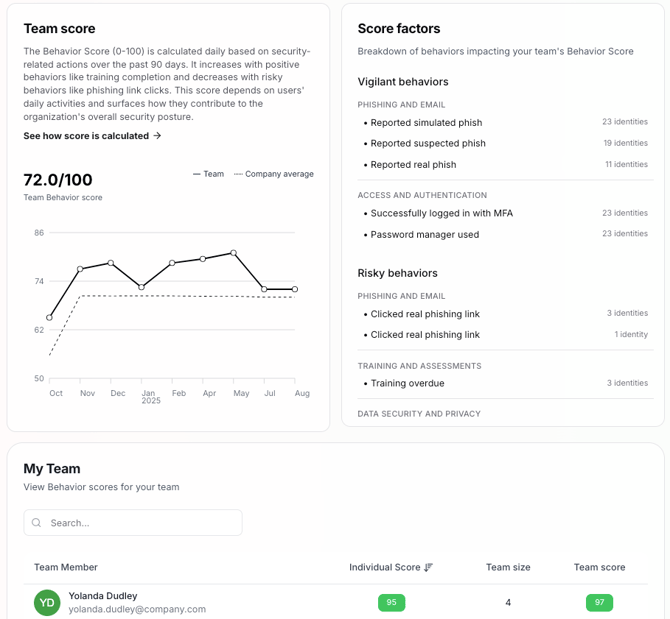
- My Team – Direct reports
- My Org – Direct + indirect reports
🕓 Data refreshes daily, ensuring up-to-date visibility for every manager.
Behavior Score Details
Behavior Scores in the Manager Scorecard use the same configuration as those in Unify, creating consistency across your organization’s risk visibility tools.
Key features include:
- Alignment with Unify behaviors (e.g., phishing detection, MFA usage, secure data handling)
- Visibility into how many team members triggered each behavior detection
- Optional privacy controls: Work with your Customer Success Manager to remove specific behaviors or categories
This unified approach allows security teams and business leaders to speak the same language when it comes to behavior and risk.
Key Differences: Admin Preview vs. Manager View
| Feature | Admin Preview (Unify) | Manager Scorecard (Dashboard) |
| Platform | Unify | Living Security Dashboard |
| Audience | Admins / Security Users | People Managers |
| Data Access | Score, trend, individual scores | All of the above, plus behavior detection breakdown |
| Purpose | Verification & planning | Manager visibility & coaching |
| Access Control | Admin-only | SSO-authenticated end users |
Benefits of Manager Scorecards
Manager Scorecards extend the value of your Human Risk Management program by:
- Promoting manager-led security awareness
- Delivering actionable, behavior-based insights
- Fostering collaboration between Security and Business Units
- Reinforcing a culture of cybersecurity accountability
Enable Your Account
Unify will leverage an existing integration to identify manager-to-direct report relationship.
Please Submit to Support the proper integration to be used, along with field names for the managers and direct reports.
If you don't have field names, provide an example of this relationship: ie., yourself and a few direct reports.
