
One SCIM is enabled, the Living Security platform no longer offers the ability to manually add users. This ensures duplicate users are not created.
However, you can toggle off SCIM in order to add users through Settings, User Provisioning, pictured here:
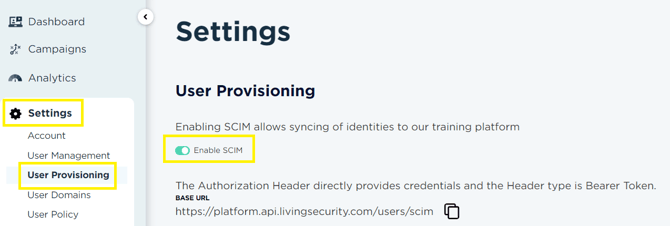
This will pause SCIM and enable all manual upload functionality through User Management:
After adding users, be sure to return to Settings, User Provisioning to toggle SCIM back on.
Uploaded attributes will not be overwritten by standard SCIM syncing cycles. To continue updating uploaded mapped attributes, a "re-provision" command is needed in your active directory; or use "Provision on demand" in your active directory for selected users.
Best Practices
✅ I need to upload values for an attribute that is not mapped to my active directory- Turn off SCIM
- Upload CSV with only the one attribute - note upload template requires all column headings to be present
- Enable SCIM
❌ I need to change the values for an attribute that is mapped to my active directory in bulk.
Not supported functionality. Please make these changes in your Active Directory
