
What information do I need to provide when uploading a SCORM file?
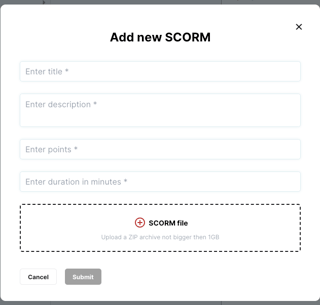
When uploading a SCORM file, you’ll be asked to:
-
Title the content
-
Enter a description
-
Assign completion points
-
Enter the duration (in minutes)
What SCORM versions are supported?
Our platform supports SCORM 1.2 and SCORM 2004.
Is there a file size limit?
Yes, the maximum file size is 1 GB. Please allow extra time for larger files to finish uploading.
How does SCORM content behave once launched?
SCORM courses function differently from our native content:
-
A SCORM file is packaged into a self-contained course container.
- Configuration settings like disabling navigational skipping or video fast forwarding are set within your SCORM package
-
Most SCORM modules are configured to track user progress internally. This means if a learner exits mid-course, the SCORM package will usually remember their place when they return.
-
This progress tracking is not visible in the Living Security platform.
The only data we receive is whether the course has been assigned and whether it has been completed. Living Security cannot see details such as where a learner left off, quiz scores, or time spent inside the course.
Think of SCORM like a “black box”—all the progress tracking happens inside, and only the final completion status is shared back.
Can learners revisit a SCORM course after completion?
No. Once a SCORM course is marked completed, the learner will continue to see it as completed on their dashboard, but the SCORM content itself cannot be reopened or revisited.
Why don’t I see detailed learner progress for SCORM courses?
Unfortunately, SCORM does not provide us with detailed tracking data. We cannot identify learners who may have completed most of the course but didn’t take the final required step to trigger completion.
Can I change the images displayed for my course on the end user's dashboard?
Yes. Please follow this image guide to provide all required image sizes for our dashboard, and submit to our Support Team.
