
Some organizations may notice that video captions or subtitle preferences do not consistently remain enabled for all learners, even when a default caption setting has been configured.
This behavior is typically caused by enterprise browser controls, privacy/security policies, or browser storage restrictions rather than the training content itself.
Common Causes
Many organizations use browser or security policies that may:
- Clear cookies or browser storage automatically
- Restrict non-essential cookies
- Block third-party browser storage
- Prevent user preferences from being saved between sessions
- Apply browser security settings that override saved video preferences
Because these settings vary by organization, browser, device, and security configuration, it can be difficult to guarantee that caption preferences will persist consistently for every learner.
Recommended Best Practice
To provide the most reliable learner experience, we recommend including a short introductory slide or video that shows learners how to:
- Select their preferred language
- Enable captions/subtitles
- Save the setting as their default preference
This allows each learner to configure accessibility settings directly within their own browser and environment.
Feel free to use our sample below, which you can download and customize here.
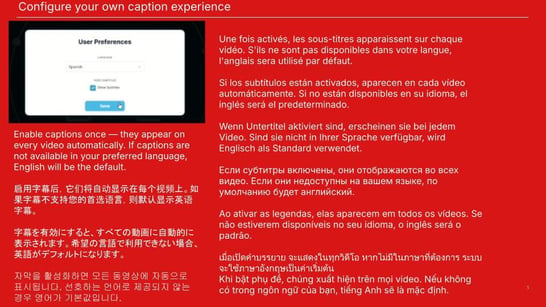
Languages in the slide:
- English
- Chinese (Simplified)
- Japanese
- Korean
- French
- Spanish
- German
- Russian
- Portuguese
- Thai
- Vietnamese
