
⚠️ Note: Telephone number mapping is optional. Your SCIM integration will work without it. Only configure this if you need telephone numbers for Smishing and Vishing campaigns.
Quick Requirements (At a Glance)
-
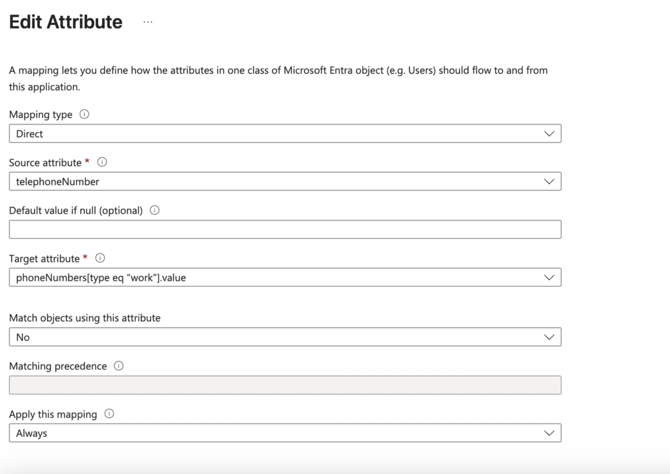
Must be mapped to:
phoneNumbers[type eq "work"].value -
Mapping type must be: Direct
-
Source attribute:
telephoneNumber -
Apply mapping: Always
-
Match objects using this attribute: No
-
Phone number must be transmitted as type work
-
If transmitted as
home,mobile, or any other type → ignored -
Mapping is optional
-
Allowed characters only:
0-9 + - ( ) . whitespace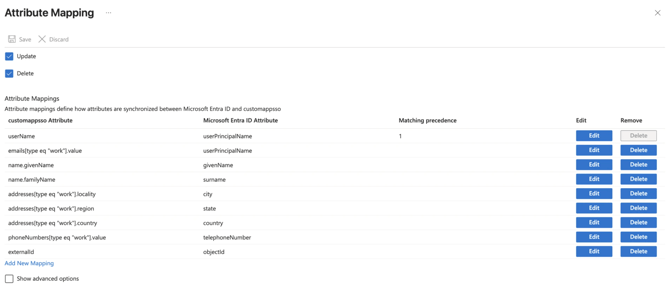
Key Requirement: Phone Number MUST be set as Work type
For the Living Security SCIM service to recognize and process a telephone number, the number must be transmitted as a work type phone number in SCIM.
Required SCIM target attribute:
*phoneNumbers[type eq "work"].value
Even if the source attribute in Microsoft Entra ID is labeled differently (for example, mobile or home), you must map and send it as work.
⚠️ Note: If the phone number is sent as mobile, home or anything else, it will be ignored by the Living Security SCIM service.
Allowed Characters:
The Living Security SCIM service accepts only the following characters in the phone number field:
-
0–9 -
+ -
- -
( -
) -
. -
Whitespace (spaces)
Any other characters may cause the value to be rejected or ignored.
