Beat the Hacker
Your regularly scheduled Cybersecurity Awareness Month event has been interrupted by a mysterious hacker! He’s infected company devices with malware that will spread through the entire network…unless your organization can beat him in a cybersecurity board game of his own design.
Roll the dice to move your team’s piece along the game board, and win mini games to earn enough points to stop the hacker’s dastardly plans. Does your team have the luck and skill needed to beat the hacker?
Trailer: (Coming Soon!)
DISCUSSION POINTS:
How many times would they like the presentation?- If client is interested in more than one hosted presentation, the experience is $7500 per additional presentation.
- Client is also allowed to share the recording of the presentation till December 1, 2024.
-
- Events are hosted via Zoom Webinar, unless client requests Microsoft Teams.
2. Whitelisting (not necessary for LS hosted, noting for other hosts)
3. Date/Time for the presentation-
- Do not schedule simultaneous meetings (trying to do this with one Host)
-
- If client is expecting over 1000 people viewing we have options to stream via YouTube, Facebook, Workplace from Meta, and Twitch. A recording can also be shared on the Living Security platform or a client’s LMS until December 1, 2023.
-
- Add calendar through email invite which gives you editing access
- Access through your google account with this link
-
- Schedule one hour event
- Change calendar event owner to Masquerade
- Schedule one hour event
-
-
- Add Guests:
- Yourself as a Guest so others can update event
- Client contact as Guest so they can be added as a panelist
- Any other Client Contacts that would like to have panelist access to the event
- Add Guests:
-
-
-
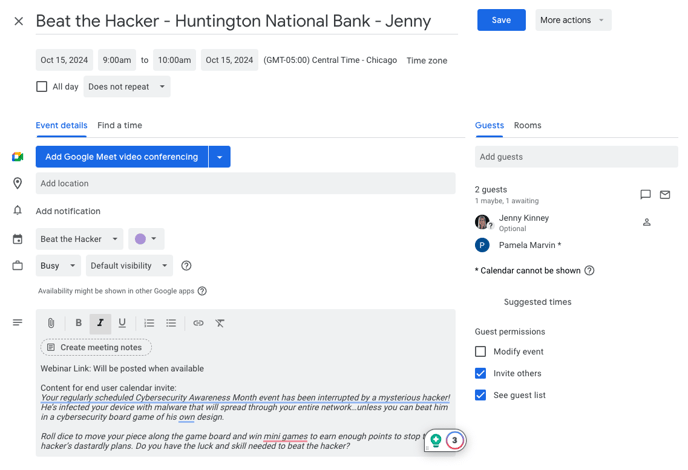
- Title event: Beat the Hacker - Company Name - CSM Name
- Within body add:
- Webinar Link: Will be posted soon
Your regularly scheduled Cybersecurity Awareness Month event has been interrupted by a mysterious hacker! He’s infected your device with malware that will spread through your entire network…unless you can beat him in a cybersecurity board game of his own design.
Roll dice to move your piece along the game board and win mini games to earn enough points to stop the hacker’s dastardly plans. Do you have the luck and skill needed to beat the hacker? - Example:
- Webinar Link: Will be posted soon
- If you are unable to book a time that works on your calendar please find another CSM to cover your client’s time slot or post in #cam_logistics channel for more assistance.
- Schedule separate 30 minute buffers
- Webinar link will be created and added to calendar event
- CSM that scheduled will be added as a co-host for the webinar
- Calendar event title will have this icon prefix added "📅"
- If you do not see above icon added by end of August, slack #CAM_Logistics
- Clients are encouraged to send session link within their own calendar invite
-
-
-
- Customization Options: The host can display a client provided logo/branded material if provided
- Webinar Wallpaper (image that will be shown behind video tiles) Image Requirements
- JPEG/JPG or 24-Bit PNG
- 1920*1080px
- Image size must be 16:9
- Maximum image size 15MB
- Virtual Background for Host Image Requirements
- JPEG/JPG or 24-Bit PNG
- 1920*1080px
- Maximum image size 15MB
- Host Intro/Outro/Discussion
- General hosts scripts will be available by the Client Demos. Client is able to make changes to the general script for their presentation.
- Webinar Wallpaper (image that will be shown behind video tiles) Image Requirements
FAQ
Recording: Yes, can be recorded – the recording can be shared with additional viewers on the Living Security platform or a client’s LMS until December 1, 2024. We ask recordings not be used after December 1. Client will need to specify if they would like the recording post-session, we will not automatically send to them.
Hosting platform: Beat the Hacker primarily hosts on Zoom Webinar but is available on Microsoft Teams by request.
Customization: If client would prefer to have the webinar branded with their info rather than Living Security, please refer client to the Customization & Special Request Form (https://securityls.typeform.com/beatthehacker)
Consultation: Not required, but possible if client prefers.
Audience size: Webinar can hold up to 1000 attendees. Overflow attendees can watch via live stream (via Youtube).
Gameplay: Gameplay throughout the experience is done directly in the Zoom Webinar using polls.
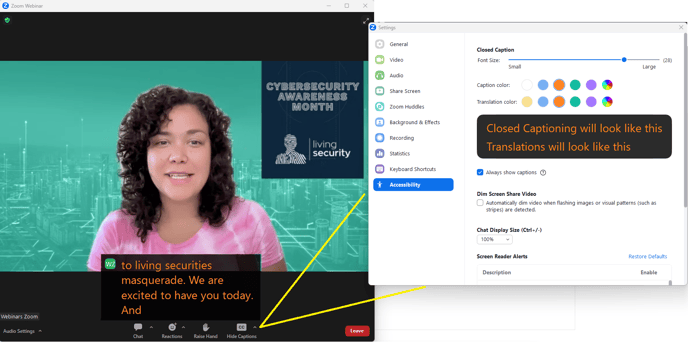
Captions: Zoom Webinar will display live captions of host and videos. These can be enabled and disabled by each participant.
Attendee Engagement: Attendees will be able to use zoom chat to interact with each other. Attendees will be muted and without video
Attendee Tracking: If clients choose to require registration for attendees email addresses will be provided by attendees. Registration can be requested on the Customization & Special Request Form (https://securityls.typeform.com/beatthehacker)
Platform Integration: Registration Modules and Completion Modules will be available on the Training Platform. For the Completion Module, the user will select what the correct answer to the Boss Battle was (to call security).
Promo Materials: Promo materials including trailer and flyers will be available as assignments on the Training Platform, as well as for download and customization on the Living Security Support Garden.
Inviting Attendees: Client should send their own meeting invite directly to their employees with the session link added as the location. Promo materials should be edited to include the direct webinar link as well.
To get a feel for the show, check out this Masquerade Trailer.
HOSTING FAQ:
Host Guide: This PDF document walks hosts through how to conduct the Masquerade experience for CSAM.
Host Video Guide: This video walks hosts through the Host Guide and goes into more detail how to host the Masquerade experience on Zoom Webinar. This should be paired with he Host Guide above.
Choose Your Own Adventure Style: This Masquerade Storymap can give you insight into how the story is laid out. At the beginning, end users will watch an intro video, then upon poll results for which character to interrogate first, the host will launch the first video of that character’s series. From there, end users are polled and the host selects which video their poll aligns to until the character path is complete, at which point the presentation will return to the top to select another character to interrogate. Once all characters have been interrogated the pre-vote video will play. End users will then be polled on who they think the guilty party is, and the final answer will be revealed.
Stornaway Video Preview: Here is a short preview of the software we will be building the choose-your-own adventure capabilities into. As a host you will be launching polls (in Zoom Webinar or client’s preferred LMS) and selecting the answer on screen that aligns with the results.
Captions